December 21, 2016
Answered

PDFs from one person opens scrambled

  • December 21, 2016
  • 3 replies
  • 1490 views

I don't think this is the perfect forum, but it's the closest I could find based on my issue.

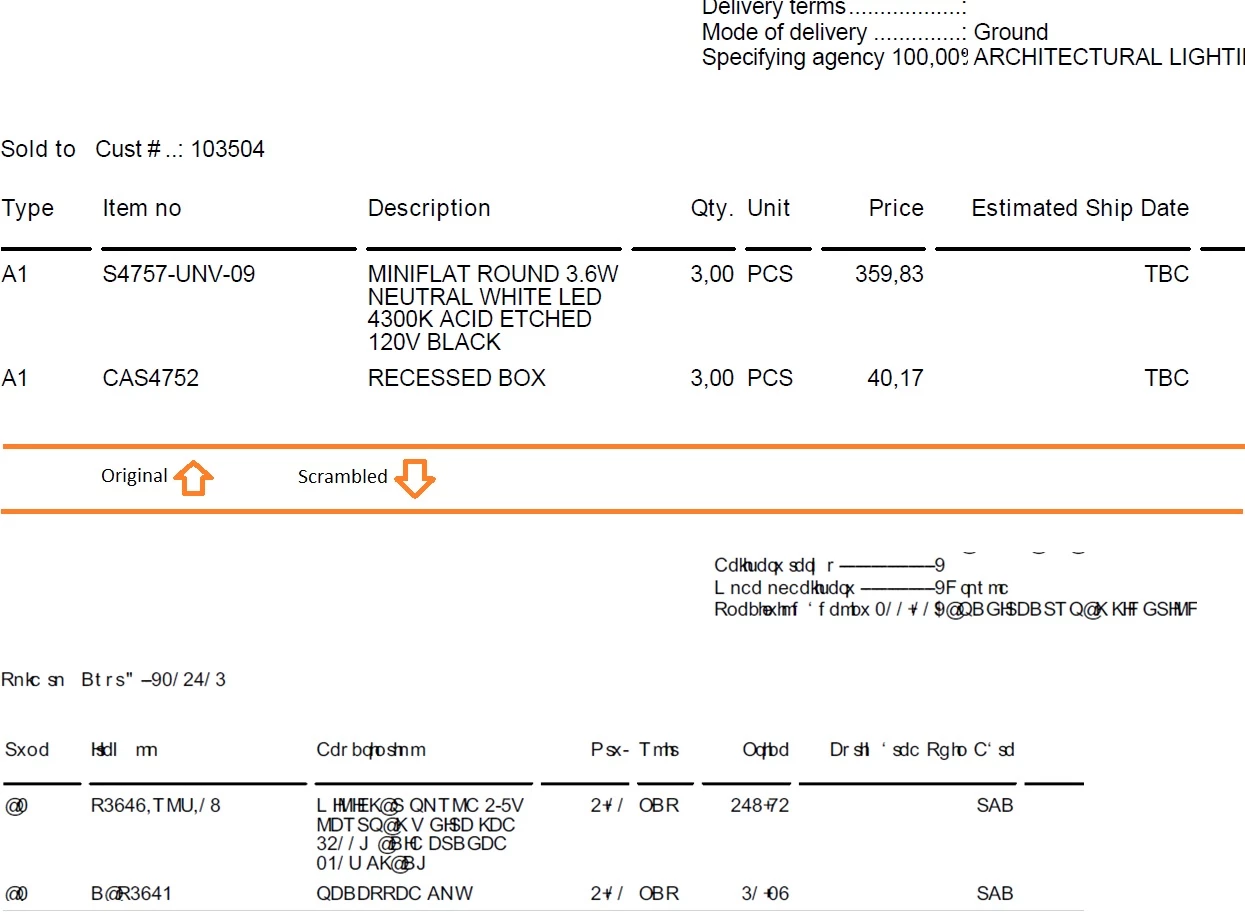
I have one person who sends me PDFs that when I open them, it shows as scrambled gibberish.  The interesting thing, the letters are one off from what they should be.  So, DOG would show up as EPH.

I am using Adobe Acrobat Standard DC Version 2015.006.30244 and every time I check for updates, it says it's updated to the latest release.

Can anyone give me insight into this problem?  I've searched Google but finding the exact problem is hard, and I've tried the solutions on the few pages that talk about PDFs opening scrambled.

Here's an example of the original and the scrambled PDFs.
Thanks in advance!

-Aaron

This topic has been closed for replies.
Correct answer Dov Isaacs

I have been in private contact with AaronB-1024 and we resolved the issue.

The file in question was fairly unusual in that it referenced but did not embed Arial and furthermore used CID / Identity-H encoding. The file also either lacked or had a defective CIDToGIDMap for the font. This would not necessarily cause the symptoms seen on all systems, but if the Arial used for creating the PDF file didn't match the Arial on the recipient's system, such symptoms (or even worse) could occur.

Fixing the PDF file and embedding the font via Acrobat DC Pro Preflight (AaronB-1024 only had Acrobat DC Standard that has no Preflight feature) resolved the problem for that file.

          - Dov

3 replies

Dov Isaacs
Dov IsaacsCorrect answer
Legend
December 22, 2016

I have been in private contact with AaronB-1024 and we resolved the issue.

The file in question was fairly unusual in that it referenced but did not embed Arial and furthermore used CID / Identity-H encoding. The file also either lacked or had a defective CIDToGIDMap for the font. This would not necessarily cause the symptoms seen on all systems, but if the Arial used for creating the PDF file didn't match the Arial on the recipient's system, such symptoms (or even worse) could occur.

Fixing the PDF file and embedding the font via Acrobat DC Pro Preflight (AaronB-1024 only had Acrobat DC Standard that has no Preflight feature) resolved the problem for that file.

          - Dov

- Dov Isaacs, former Adobe Principal Scientist (April 30, 1990 - May 30, 2021)
December 21, 2016

Thanks, Dov!

The file has been sent.

Dov Isaacs
Legend
December 21, 2016

It would really help us investigate the problem if you were able to post such a PDF file for us to examine. I suspect that the issue is actually related to unembedded fonts and/or character mapping. I doubt that it is some type of generic Acrobat issue. Post the sample and we will be able to determine what created those PDF files and what the real underlying issue is.

          - Dov

- Dov Isaacs, former Adobe Principal Scientist (April 30, 1990 - May 30, 2021)
December 21, 2016

I don't think it'd be acceptable for them if I posted the PDF in the public.  It's an invoice from a client with private information.  I removed some of that information in the screenshots just to keep myself from getting in trouble.

I would be happy to send the PDF privately to you as you are noted as Staff.  Would you mind if I do that?

Dov Isaacs
Legend
December 21, 2016

I'll privately send you my Adobe e-mail address such that you can send the file to me. We'll treat the file, like other customer files sent to us for analysis, as strictly confidential.

          - Dov

- Dov Isaacs, former Adobe Principal Scientist (April 30, 1990 - May 30, 2021)