Participating Frequently
September 9, 2026
Answered

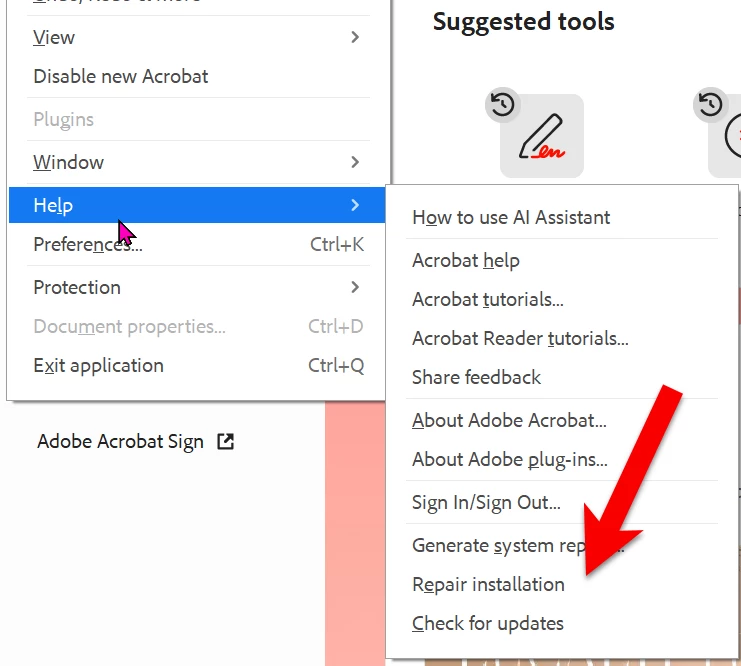
PDFs stopped opening on Acrobat Pro on my laptop--either from existing files or the web. Where is "repair installation"? Any other suggestions?

  • September 9, 2026
  • 13 replies
  • 56 views

Very simple question. No other details necessary

    Correct answer Dave Creamer of IDEAS

    Repair is under the Help menu in both interfaces. 


    13 replies

    Dave Creamer of IDEAS
    Community Expert
    Dave Creamer of IDEASCommunity ExpertCorrect answer
    Community Expert
    September 9, 2026

    Repair is under the Help menu in both interfaces. 


    David Creamer: Community Expert (ACI and ACE 1995-2023)
    Participating Frequently
    September 9, 2026

    Thanks! Disabling New Acrobat worked. And I saw the Help option along the top of the screen, not in a drop-down menu.

    But now I don’t see how to get the New UI back. The button that said Menu at the upper left (and allowed me to disable New Acrobat) is no longer there.

    (I have to leave for the day so please don’t expect a quick response.)

    Dave Creamer of IDEAS
    Community Expert
    Community Expert
    September 9, 2026

    To get the the new UI back, look under the View menu. 

    David Creamer: Community Expert (ACI and ACE 1995-2023)
    Karl Heinz  Kremer
    Community Expert
    Community Expert
    September 9, 2026

    On Windows, you should find the repair option in the Help menu. Are you on Windows or on a Mac? 

    Participating Frequently
    September 9, 2026

    Yes, I’m on Windows, but Adobe’s Help menu (the ? in the upper-right corner) doesn’t list Repair Installation.

    Karl Heinz  Kremer
    Community Expert
    Community Expert
    September 9, 2026

    Ah, I don’t know where they’ve hidden this in the “New Acrobat” user interface. When you switch to the old interface, you will find this function in the Help menu.