
Participant
May 2, 2021
Question

Percentage Calculation based on if Check Box is checked

  • May 2, 2021
  • 2 replies
  • 2307 views

Hello,

I am trying to do a calculation where there is a 10% discount to the subtotal when the check box is checked, but no discount if the box is not checked. The code that is currently there is what I was given by my professor, but it does not work. Could any experts help me out please? Thank you 
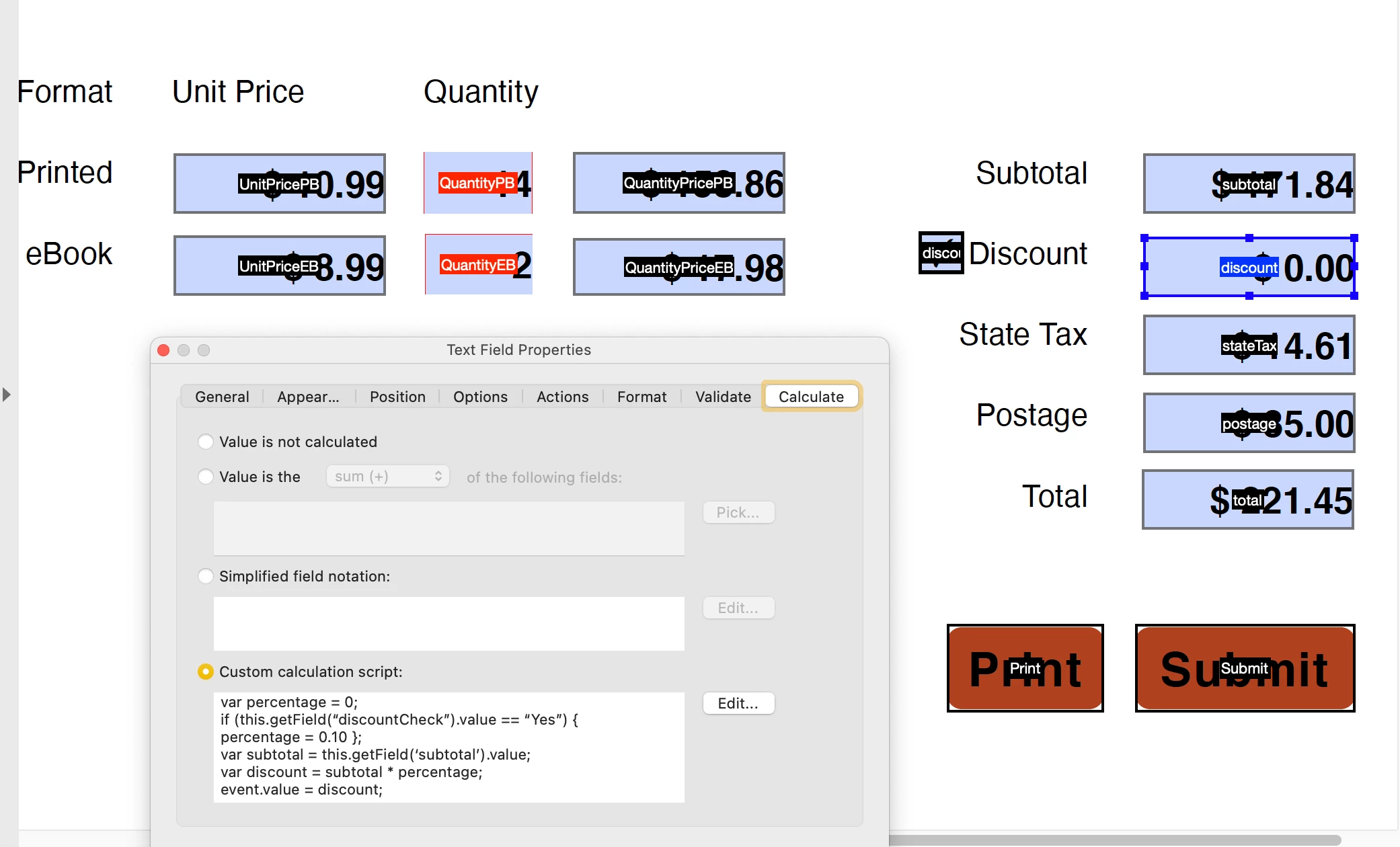
This topic has been closed for replies.

2 replies

JR Boulay
Community Expert
Community Expert
May 3, 2021

Such a simple operation does not require Javascript.


- Assign "0.10" as the export value to the Discount-checkbox

- Assign this calculation to the Discount text field: Subtotal x Discount-checkbox


Acrobate du PDF, InDesigner et Photoshopographe
ls_rbls
Community Expert
Community Expert
May 3, 2021

Yes, absolutely... I thought of that too but then again is a homework that the professor gave the students and he/she wanted the students to figure out the script that was given in class.

Participant
May 3, 2021

@ls_rbls @JR Boulay @Nesa Nurani I really appreciate all of you. Thank you. For some reason, the original code wasn't changing anything, possibly because there was no mention of changing the export value in my professor's guide? I'm not sure. 

ls_rbls
Community Expert
Community Expert
May 3, 2021

Did your professor gave you this code as a homework to find out what is wrong with it?


For starters, it looks like you copied the code into the JavaScript editor from the Internet or another program.


The use of all the quotes in that script are not the correct fontype (or typeface). This will posibbly throw some  errors.


The other thing, is that you need to be more specific and explain what exactly is the intent of the script as it was explained to you in class.


You should use these type of quotes "", for example.


Also, there are different ways of achieving the same results with JavaScript and built-in features.


So where is this executing from? From the checkbox field object or one of the text fields as a custom calculating script?

Participant
May 3, 2021

Thanks for responding.

No, the professor provided the code as part of a guide and said that we could just copy-paste it into the custom calculation dialogue box. They did not go into further detail after "discount" showed the default value of $0.00. I addressed it last class, but they told us they don't know, so my entire class and I have been trying to find a solution. 

I'm sorry for not being specific enough. The screenshot has the script executing from the "discount" text field. The checkbox that is next to it is named "discountCheck". What we are required to achieve is when the checkbox "discountCheck" is selected, the text field "discount" will show 10% of the value from "subtotal", but as a negative value. For example, if "subtotal" showed a value of $100.00, selecting the "discountCheck" checkbox will result in "discount"  having a value of -$10.00. 

If "discountCheck" is unselected, then "discount" will have a value of $0.00. I hope this makes more sense.

ls_rbls
Community Expert
Community Expert
May 3, 2021

++ EDITED REPLY,  found some errors in the example script


If I understood correctly, the custom calculation script will be used in the checkbox field, and will execute the calculation when the checkbox is ticked and display the resulting total in the "discount" field, correct?


See script example below , always declare your variables first on top of the script. 

Note that variable "f" in my example is used to listen for the checked state of the checkbox, in which case, "Yes"  will be used as the export value of this checkbox when it is ticked on.

Var f will also listen to the unchecked state of this checkbox, in which case, "Off"  will be used as the export value when the checkbox is ticked off. 

So again, in the example below, the script will execute from the checkbox field object, which is our event target field (or the field where this script will execute if the desired conditions are met. )

Our conditions will consist of the product  that will be obtained from the value in the  "subtotal" field multiplied by the desired percentage (.10).


The total product will be  populated automatically in the  discount "field" when the checkbox is ticked on, and will display a value of zero (0) if the checkbox is ticked off.


var f = even.target;
var subtotal = this.getField("subtotal").value;

if (f.value !== "Off") {

this.getField("discount").value = subtotal - (subtotal * .10);

} else {

this.getField("discount").value = 0;

 }

}


NOTE: Like I said before, this can be done in many ways using Acrobat JavaScript. See if my example script works. I am texting from a mobile device and I haven't tested it yet. Let me know if it helps or if it is throwing any errors.