Percentages not showing decimal places
In the following table extract, the sub total field automatically adds everything above.
The VAT amount is an open field
The total field multiplies the sub total by the vat amount.
The bits with the yellow lines are hidden fields.
My issue is if I type 7.5 into the VAT amount field, as you can see it displays it as 8%, BUT it calculates as 7.5.
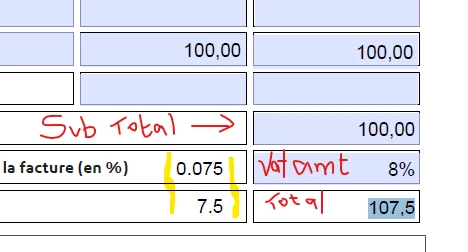
How do I get the VAT amount field to display 7.5 and NOT 8?
There is code already in the VAT amount field but I don't know how to change it, if that is what's needed. Code is as below:
Custom Format Script
if (event.value !=="" && !isNaN(event.value)){
event.value = util.printf("%.0f%", event.value);
}else{
event.value = "";
}
Custom Keystroke Script
if(event.willCommit)
{
console.println(event.value);
switch(event.value)
{
case "0%":
this.getField("Vat_amt").value = 0.00;
break;
case "20%":
this.getField("Vat_Amt").value = 0.20;
break;
default:
this.getField("Vat_Amt").value = 0;
break;
}
}
 AdChoices