


Participant
March 11, 2022
Answered

Persistent Error Code 0xC0000001 for AcroCEF.exe for Adobe Acrobat Reader DC

  • March 11, 2022
  • 14 replies
  • 30198 views

I work IT, and I've noticed recently that there have been multiple computers with the same error message for AcroCEF.exe.
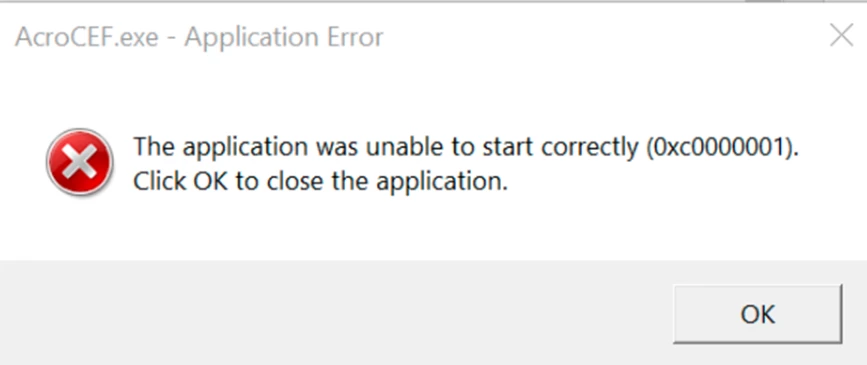
This error started to appear on March 9th, 2022. 

My team and I have tried to uninstall and reinstall Adobe Acrobat Reader DC multiple times , but it the error comes back for some computers after the system is restarted. Has anyone found the cause and solution to this problem?

This topic has been closed for replies.
Correct answer AMu

With the latest release of Acrobat on 12th April, 2022, this issue has been addressed.


If your product is not already updated, you can manually do so from within the product.  Click on the menu Help-> Check for updates.

14 replies

AMuCorrect answer
Participant
April 12, 2022

With the latest release of Acrobat on 12th April, 2022, this issue has been addressed.


If your product is not already updated, you can manually do so from within the product.  Click on the menu Help-> Check for updates.

Participant
March 24, 2022

Just ran into the same issue.  Solved it, perhaps by luck.  

Of all the uninstall/reinstall methods, interestingly, if I just us Windows 10 > Settings > Apps to remove Pro DC, it prompts for a reboot. AFter this, installing it worked and no CEF errors.  

Yet previously, uninstalling never promted for a reboot.  I believe I was using the Creative Cloud app interface to manage that . 

So it may come down to the managed installer process from Adobe has a glitch (I guess?).  Very vague here, sorry, but the key point was that prior to it workin, the uninstall done via Settings in Win 10 did the standard "you must restart your computer...." Yes/No dialogue box. This seems to open the door for a clean removal, and then it works on subsequent install.  

Participant
March 29, 2022

any update from Adobe? I hit the same issue, happened in 1000+ workstations. Any workaround apart from re-install?

Adobe Employee
March 29, 2022

Apology for the inconvenience caused to you due to this issue. We have investigated this at our end.

Please try the following workaround to fix this.

Please set the following regkey-
For Win 64-bit:
[HKEY_LOCAL_MACHINE\SOFTWARE \Adobe\Adobe Acrobat\DC\DLLInjection]

"bBlockDLLInjection"=0

For 32-bit (Acrobat):

[HKEY_LOCAL_MACHINE\SOFTWARE\WOW6432Node\Adobe\Adobe Acrobat\DC\DLLInjection]

"bBlockDLLInjection"=0

For 32-bit (Reader):

[HKEY_LOCAL_MACHINE\SOFTWARE\WOW6432Node\Adobe\Acrobat Reader\DC\DLLInjection]

"bBlockDLLInjection"=0


(bBlockDLLInjection should be a Dword)


If the problem is still reproducible, please let us know.


Thanks,

-amboo


Likes

 
Participant
March 23, 2022

1. Uninstall Adobe Acrobat
2. Download the Adobe AcroCleaner.exe tool.
3. Launch the tool
4. Reinstall Adobe Acrobat

https://www.adobe.com/devnet-docs/acrobatetk/tools/Labs/cleaner.html#downloads
For Windows

Participating Frequently
March 24, 2022

Having the same issue. Windows 10 version 21H1 and Adobe Reader DC version 22.001.20085.  The only fix I have found, which is really a workaround, is to uninstall Acrobat, nuke any Adobe folder in C:\Program Files, C:\Program Files (x86), C:\ProgramData, and C:\Users\UserProfile\AppData\Local...AppData\LocalLow and AppData\Roaming, then reinstall 22.001.20085.  Total sh!tsh0w.

Participant
March 17, 2022

I was able to solve the problem by:

- uninstalling Acrobat Reader DC

- runnning  AdobeAcroCleaner_DC2021 -> https://www.adobe.com/devnet-docs/acrobatetk/tools/Labs/cleaner.html

- reinstalling Reader DC

Participant
March 17, 2022

Strange...

My post about registry modification for stop automatic Adobe updating has been deleted...

Participant
March 17, 2022

Hi,

I work in IT Field.

I have tried to uninstall and reinstall Adobe Acrobat Reader DC newer and older version multiple times , but it the error still comes back. 

PCs and Laptop using Windows 10 version 21H2 and Adobe Reader DC version 22.001.20085.


Amal.
Community Manager
Community Manager
March 17, 2022

Hi there


Hope you are doing well and sorry to hear that


would you mind collecting Adobe crash logs https://helpx.adobe.com/acrobat/kb/collect-logs-crash-freeze.html  as described here also please collect procmon logs (Win Only) as described here https://www.adobe.com/devnet-docs/acrobatetk/tools/Labs/acromonitor.html  and share them via document cloud link as described here https://helpx.adobe.com/document-cloud/help/sharing-pdfs.html  so that we can isolate the issue for the fix.


Regards

Amal

Participant
March 16, 2022

IT Support here, and I am having multiple users with the same issue. Uninstalling/reinstalling, repair, updating, nothing fixes it. Version 22.001.20085

Adobe Employee
March 28, 2022

Apology for the inconvenience caused to you due to this issue. We have investigated this at our end.

Please try the following workaround to fix this.

Please set the following regkey-
For Win 64-bit:
[HKEY_LOCAL_MACHINE\SOFTWARE \Adobe\Adobe Acrobat\DC\DLLInjection]

"bBlockDLLInjection"=0

For 32-bit (Acrobat):

[HKEY_LOCAL_MACHINE\SOFTWARE\WOW6432Node\Adobe\Adobe Acrobat\DC\DLLInjection]

"bBlockDLLInjection"=0

For 32-bit (Reader):

[HKEY_LOCAL_MACHINE\SOFTWARE\WOW6432Node\Adobe\Acrobat Reader\DC\DLLInjection]

"bBlockDLLInjection"=0


If the problem is still reproducible, please let us know.


Thanks,

-amboo

Participant
March 28, 2022

Hi Amboo,

What key should I select and set to add this regkey, Dword or other?

Participant
March 16, 2022

Same problem here with:

- Acrobat Reader DC Version 2022-001-20085 64-bit

- Windows 10 Home Version 21H1


I tried to uninstall/reinstall without success. I also found old files in Program Files (x86) which I deleted.

PSD IT Admin
Participant
March 16, 2022

same issue here 
windows 10 pro 21H2

Amal.
Community Manager
Community Manager
March 16, 2022

Hi there


Hope you are doing well and sorry to hear that


would you mind collecting Adobe crash logs https://helpx.adobe.com/acrobat/kb/collect-logs-crash-freeze.html  as described here also please collect procmon logs (Win Only) as described here https://www.adobe.com/devnet-docs/acrobatetk/tools/Labs/acromonitor.html  and share them via document cloud link as described here https://helpx.adobe.com/document-cloud/help/sharing-pdfs.html  so that we can isolate the issue for the fix.


Regards

Amal


Participant
March 15, 2022

Same here, I am facing the same issue. I have tried :


Uninstalling and reinstalling current version of Adobe Reader and the older variant that I could find. 

Adobe Employee
March 16, 2022

Could you please share the Reader DC and OS version where you are facing this issue?


thanks,

-amboo