Inspiring
October 11, 2024
Answered

Phone Number Formating Adobe Acrobat Pro DC Prepare Form

  • October 11, 2024
  • 1 reply
  • 1462 views

How can I get a number formated the way I would like it?
999-999-9999
what properties tab do I need to go to and use to get a number that is typed in the text box to format like above?
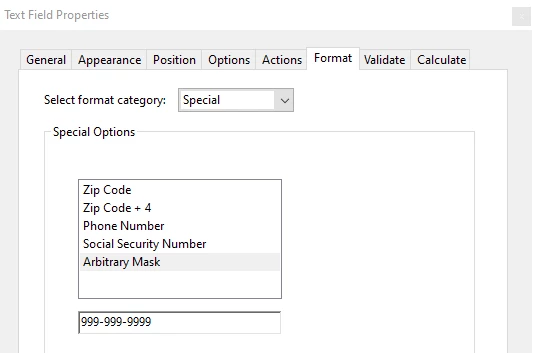
Properties > Format Tab > Special > Phone Number has (around the area code) I would like the format to be separated with dashes only. 

How can I make the dashes appear on the screen so the person filling out the form sees / understands the format?

Screen shots are very helpful.  Thank you for your help.

This topic has been closed for replies.
Correct answer PDF Automation Station

Arbitrary Mask with a format of 999-999-9999 does not format a phone number with parentheses.  It formats the number as described (3 digits, dash, 3 digits, dash, 4 digits).


1 reply

PDF Automation Station
Community Expert
Community Expert
October 11, 2024

From the Format dropdown in the field properties, select Special, then Arbitrary Mask, then enter 999-999-9999;

Inspiring
October 11, 2024

I did that option but it formats the phone number with paranthesis as I mentioned in my question
Special Phone Number formats (999) 999-9999

I know I am being picky but I would like the format to be 999-999-9999 and somehow show the person filling out the form that the dashes will automatically be there.

Thank you for your help.

PDF Automation Station
Community Expert
Community Expert
October 11, 2024

Arbitrary Mask with a format of 999-999-9999 does not format a phone number with parentheses.  It formats the number as described (3 digits, dash, 3 digits, dash, 4 digits).