Friends10
Participating Frequently
June 20, 2022
Answered

Please make Crop Pages separate from Edit PDF again

  • June 20, 2022
  • 2 replies
  • 583 views

I often need to just crop a page and not edit anything else. When you select Edit PDF it tries to recognize all the text and images and can cause the file to change fonts. I'm a printer and customers send me files with fonts I don't have. It's very frustrating. It would be nice to have the crop feature outside the Edit tool.   Thank you.
This topic has been closed for replies.
Correct answer JR Boulay

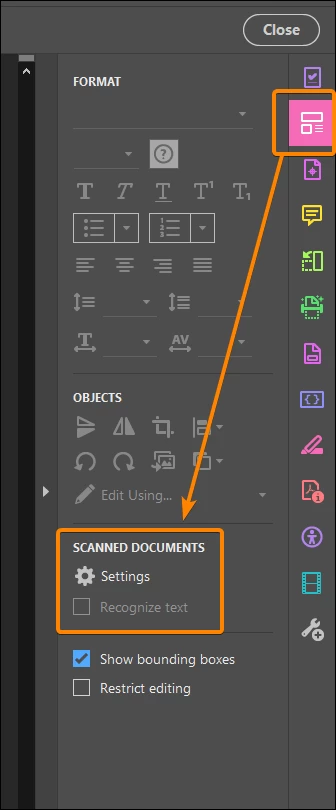
You just have to uncheck the "Recognize text" option in the Edit tools pane, so Acrobat will no longer try to do it:


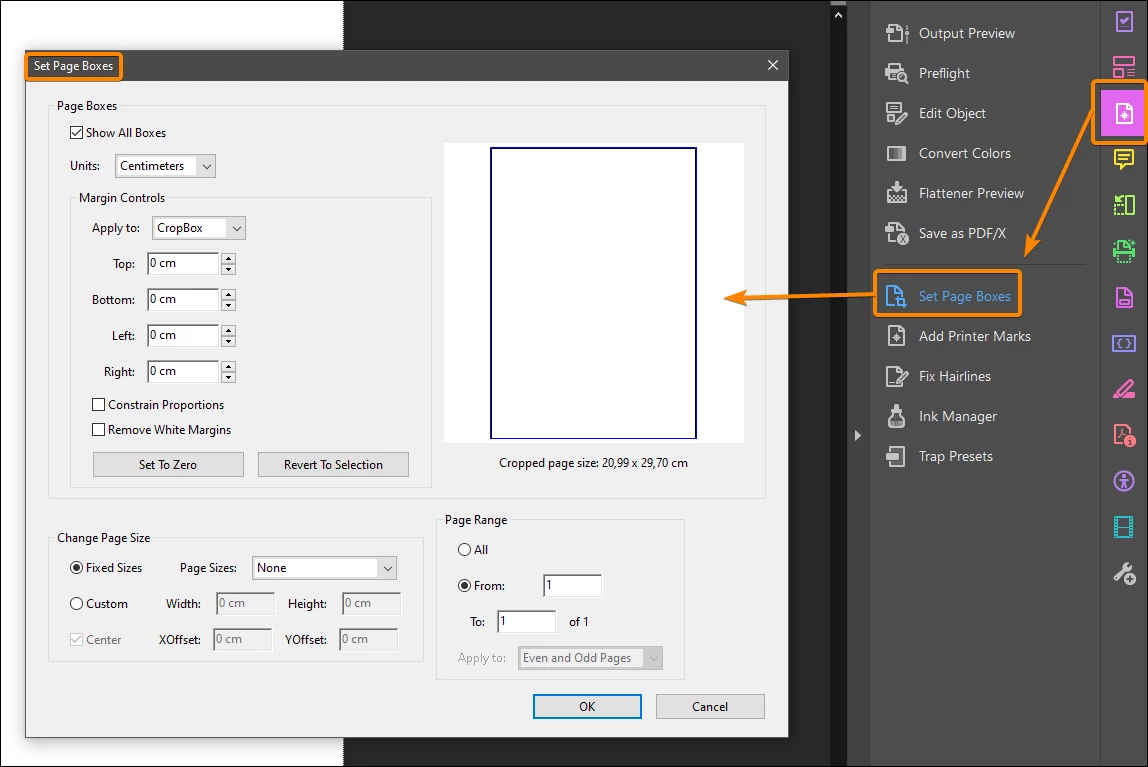
Otherwise you can find the same tool for cropping in the Print Production pane (Set Page Boxes):


2 replies

JR Boulay
Community Expert
JR BoulayCommunity ExpertCorrect answer
Community Expert
June 21, 2022

You just have to uncheck the "Recognize text" option in the Edit tools pane, so Acrobat will no longer try to do it:


Otherwise you can find the same tool for cropping in the Print Production pane (Set Page Boxes):


Acrobate du PDF, InDesigner et Photoshopographe
Legend
June 20, 2022

You can still Crop from Organize Pages. And also from Thumbnail view, as in all versions before. Tip: right click on the thumbnail.