
Participant
July 8, 2020
Answered

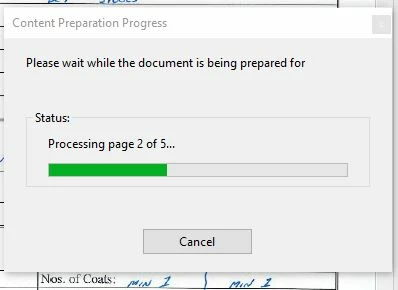
Please wait while the document is being prepared for

  • July 8, 2020
  • 2 replies
  • 10275 views

For the last 2 days I have been getting this message using Adobe Acrobat.  It gives this message when opening a file, and does eventually finish "preparing", but when I try to save the file I get this same message and it just never finishes.  I always have to click on cancel. These are NOT large files - file sizes are max 900Kb, often much smaller.   I'm on a fairly new Windows 10 pc with current updates applied.   Can anyone help?
This topic has been closed for replies.
Correct answer Amal.

Hi Aaxof


++ Adding to the discussion


You may also take a look at the help page https://helpx.adobe.com/acrobat/kb/message-content-preparation-progress-opening.html and see if that helps.


Let us know how it goes


Regards

Amal

2 replies

Amal.
Community Manager
Amal.Community ManagerCorrect answer
Community Manager
July 9, 2020

Hi Aaxof


++ Adding to the discussion


You may also take a look at the help page https://helpx.adobe.com/acrobat/kb/message-content-preparation-progress-opening.html and see if that helps.


Let us know how it goes


Regards

Amal

aaxofAuthor
Participant
July 9, 2020

Thanks Amal for your quick reply! That did indeed work.  I did do a search prior to posting my question, but I don't know why my search here didn't return any results.


Any idea how this got turned on in the first place?  Was it maybe a shortcut I inadvertantly hit by mistke or something?  I know I didn't go into Accessability to set it....


Thanks again 🙂

JR Boulay
Community Expert
Community Expert
July 9, 2020

"Any idea how this got turned on in the first place?"

It is enabled by default.

Acrobate du PDF, InDesigner et Photoshopographe
JR Boulay
Community Expert
Community Expert
July 8, 2020
Acrobate du PDF, InDesigner et Photoshopographe