
Participant
December 7, 2022
Question

plug and play template
  • December 7, 2022
  • 3 replies
  • 2368 views

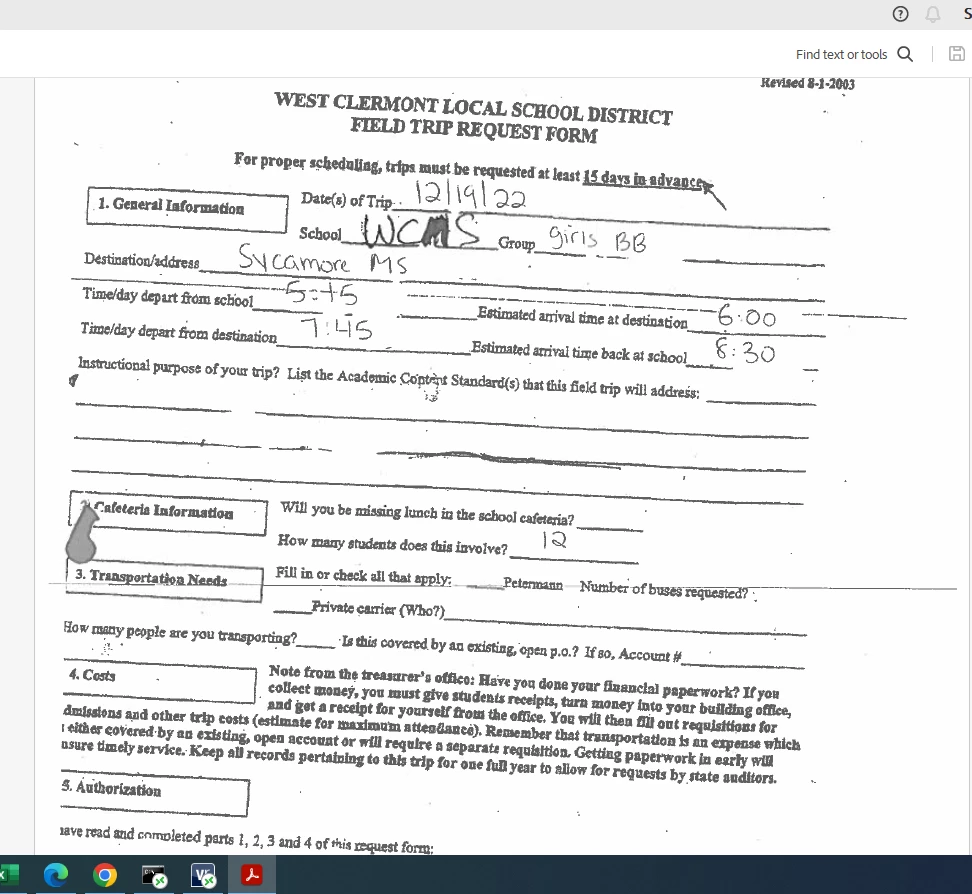
I didn’t know if there is a way to create a master template within adobe with the full package to where if I scan a document in, it will fill in fields on a master template.

For example on the document attached, when its scanned in I’d like the (school, group, destination, all 4 time slots, and number of buses) to be in field boxes so that I can copy and paste the information into our CRM program?

This topic has been closed for replies.

3 replies

JR Boulay
Community Expert
Community Expert
December 8, 2022

This is a fax, not a scan…

Acrobate du PDF, InDesigner et Photoshopographe
Legend
December 8, 2022

Acrobat doesn't recognise handwriting at the best of times... No, this is too difficult. Someone will need to retype this info. If you want to automate it you need to provide them with a web form. FORGET PDF, there is a world of learning, pain and limitations. Maybe Google Forms? 

JR Boulay
Community Expert
Community Expert
December 9, 2022
quote

FORGET PDF, there is a world of learning, pain and limitations. Maybe Google Forms? 


By @Test Screen Name


Are you serious?

Acrobate du PDF, InDesigner et Photoshopographe
Thom Parker
Community Expert
Community Expert
December 7, 2022

No, there is no built-in template method for doing this. But if a document can be cleanly scanned and OCR'd, then text can be extracted and placed onto another form. So this process can be done, within reason. Reason being a good OCR.  The image you've shown is pretty bad, and would not OCR well. 


The text extraction process requires a custom solution. 


Thom Parker - Software Developer at PDFScriptingUse the Acrobat JavaScript Reference early and often
Bernd Alheit
Community Expert
Community Expert
December 7, 2022

This is not possible with Adobe Acrobat.

Participant
December 7, 2022
Any ideas or guidance on how it could be done