


Participant
May 7, 2025
Answered

Populating Text Field Based on Dropdown Item

  • May 7, 2025
  • 3 replies
  • 993 views

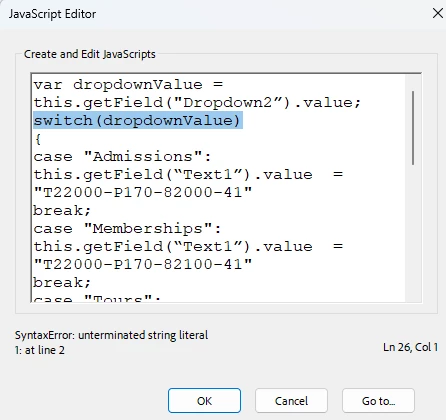
I am having trouble with the switch line in a script I am trying to create.  I am trying to get a text field to autofill with specific account number when the account type is selected from the dropdown button. I have tried using dropdownValue and eventValue as well putting a dot in between and still have the same syntax error each time.

 

Correct answer Nesa Nurani

An alternative approach is to assign the desired codes as the export values for each dropdown choice. For example, for "Admissions," set the export value to T22000-P170-82000-41, and apply similar formatting for the remaining options.

Then, in the custom calculation script of the text field, use the following code:

event.value = this.getField("Dropdown2").value;

This will ensure the selected export value is automatically populated in the text field.

3 replies

Nesa Nurani
Community Expert
Nesa NuraniCommunity ExpertCorrect answer
Community Expert
May 8, 2025

An alternative approach is to assign the desired codes as the export values for each dropdown choice. For example, for "Admissions," set the export value to T22000-P170-82000-41, and apply similar formatting for the remaining options.

Then, in the custom calculation script of the text field, use the following code:

event.value = this.getField("Dropdown2").value;

This will ensure the selected export value is automatically populated in the text field.

Participant
May 8, 2025

This worked!  Thank you so much Nesa and try67 for all your help!  I greatly appreciate it!

JR Boulay
Community Expert
Community Expert
May 7, 2025

Start by quitting and restarting Acrobat, it often becomes unstable after trying several different JavaScripts.

Edit: try67 answer is full of common sense.

Acrobate du PDF, InDesigner et Photoshopographe
try67
Community Expert
Community Expert
May 7, 2025

You must only use straight quotes in your code, not curly ones.

Participant
May 8, 2025

Do you mean quotation marks or parentheses? If quotation marks, not sure how mine sarted going from straight to angled.  I will retype them all and see if that helps.

try67
Community Expert
Community Expert
May 8, 2025

Quotation marks. It probably happened if you use an application like Word for writing the code, as it tends to do that automatically (unless you tell it not to). It's better to use a plain-text editor for your code. If you're on Windows, I highly recommend the free (and open-source) Notepad++.