
Participant
October 19, 2023
Question

Portfolio PDF not showing pages

  • October 19, 2023
  • 2 replies
  • 1252 views

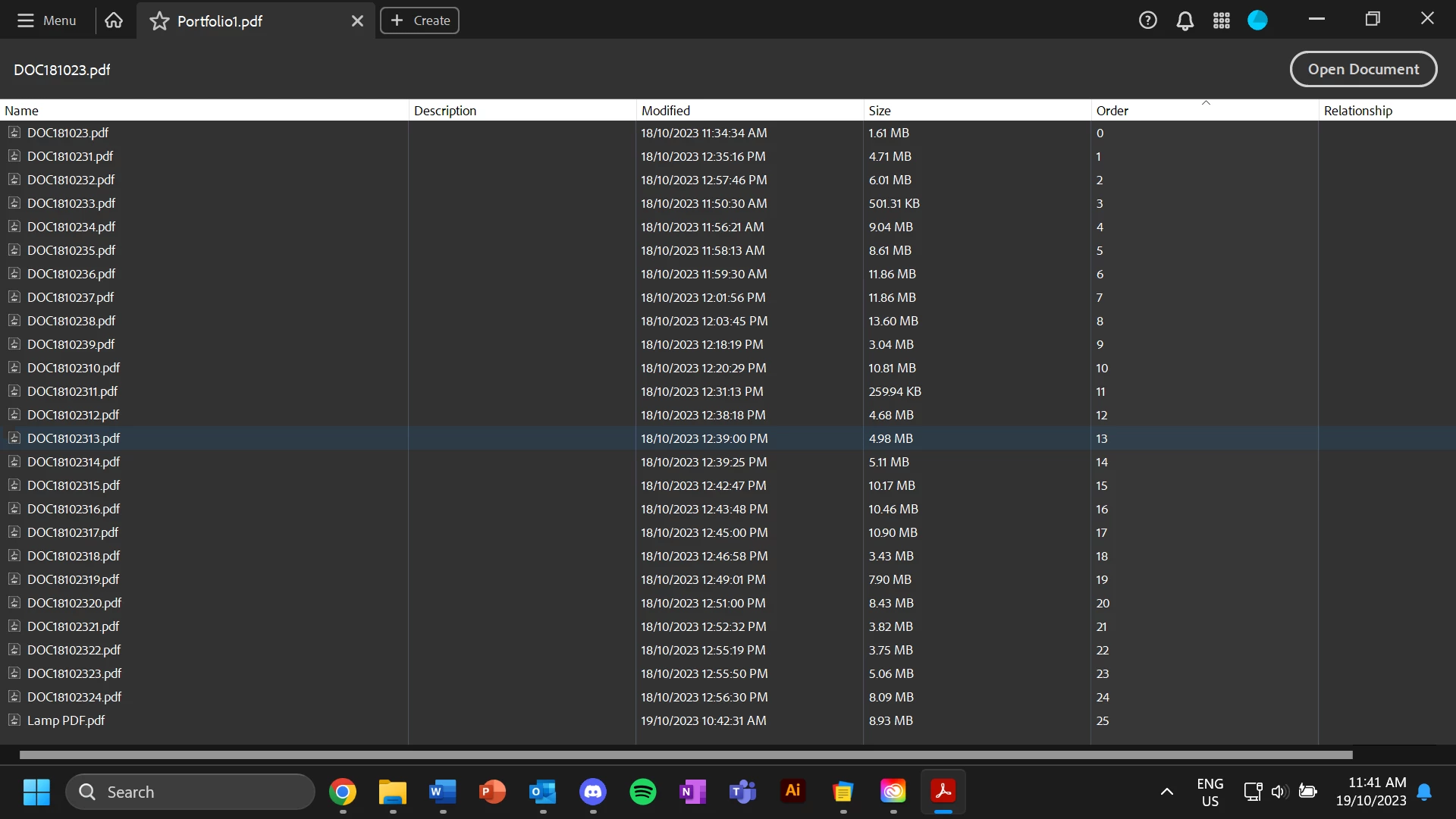
I want to create a portfolio pdf out of a number of printer scans that I have all in the same folder. I hit create<portfolio pdf and then selected from folder. However when I do this rather than show the pages it just lists all the documents, and when I hit Open Document it just opens the individual document. There are no tool bars or anything. Apart from this my Acrobat is working fine and tool bars are where they are meant to be. Does anyone know what I need to do to fix this?
This topic has been closed for replies.

2 replies

Meenakshi_Negi
Legend
October 23, 2023

Hi


Thank you for reaching out and reporting this.


We are sorry for the trouble caused. This has been reported to the team, and they are looking into this. Currently, you can open files individually on alternate tabs.


We acknowledge that the new Acrobat represents a notable change. However, we hope that as you get familiar with the new interface, you will be able to be more productive & get more out of Acrobat.  To learn more about the new Acrobat, refer to the following post: https://community.adobe.com/t5/acrobat-discussions/learn-about-new-acrobat/td-p/14078856.


As we made these changes in the interface, we have tried to ensure all tools & features that are currently supported retain their familiar functionalities and workflows as they did in the previous version. We are committed to addressing any gaps or issues reported by users related to any break in current workflows in all our past & upcoming releases. In case any of your current workflows are not functioning as expected, do share them with us on this thread, and we will address them with the highest priority. 


In case any of your critical workflows are impacted, you have the option to switch back to the old UI from the “Menu” on the top left corner of Windows and View Menu on MacOS.


Thanks,

Meenakshi

Participating Frequently
October 26, 2023

Scroll bars have completely disappeared both in the main Page View and in the Page Thumbnails. The only way to navigate through the document is Up and Down Page Arrows. This can not possibly be the imtentional purpose of the "modern scrolling experience," it renders navigation dysfunctional. What is going on here?

Les barres de défilement ont complètement disparu à la fois dans la vue de page principale et dans les vignettes de page. La seule façon de naviguer dans le document consiste à utiliser les flèches de page haut et bas. Cela ne peut en aucun cas être le but intentionnel de « l’expérience de défilement moderne », car cela rend la navigation dysfonctionnelle. Qu'est-ce qui se passe ici?

Meenakshi_Negi
Legend
November 7, 2023

Hi DonQPublic,


Sorry about the delay in response.


Please refer to the information provided in the following help document about Acrobat scroll framework upgrades for macOS: https://helpx.adobe.com/acrobat/using/scroll-framework-upgrade-macos.html.

However, this has been reported to the team, and they are looking into this.

As the team is working on this, we will keep you updated with the latest information.

We appreciate your patience.


Thanks,

Meenakshi

Bernd Alheit
Community Expert
Community Expert
October 19, 2023

What happens when you disable the new UI?