
Participant
July 30, 2024
Question

Portfolio won't open in file view with acrobat reader

  • July 30, 2024
  • 4 replies
  • 773 views

My portfolio only open in detail mode with acrobat reader which does not happen with acrobat standard.

It tried to change view mode by checking the box for File Mode in accessibility menu. It's not working.
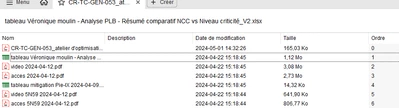
 

It was working until a few days ago. How can i get the other display with the files on the side?

This topic has been closed for replies.

4 replies

creative explorer
Community Expert
Community Expert
July 30, 2024

On the right side, is list view, and beside the list view icons are 4 squares for thumbnail view.


Thumbnail view


m
Participant
July 30, 2024

It's not in the recent section. The change in recent don't impact the list. It's when i open it. 


This is what i see :


This is what i want to see


But I'm not able to change view in acrobat reader. 

Souvik Sadhu
Legend
August 2, 2024

Hi @Sarah38903056n3rw,


 Hope you are doing well. Sorry for your experience with Acrobat Reader!


Would you mind sharing a few more info for further investigation:

1. The app version number of Acrobat you use (go to Menu-> Help-> About Adobe Acrobat);

2. A screen recording video of the event for better understanding.


Look forward to hearing from you.


-Souvik