
Participant
March 26, 2024
Question

Poster Printing only prints to one page

  • March 26, 2024
  • 7 replies
  • 3476 views

Hello everyone,

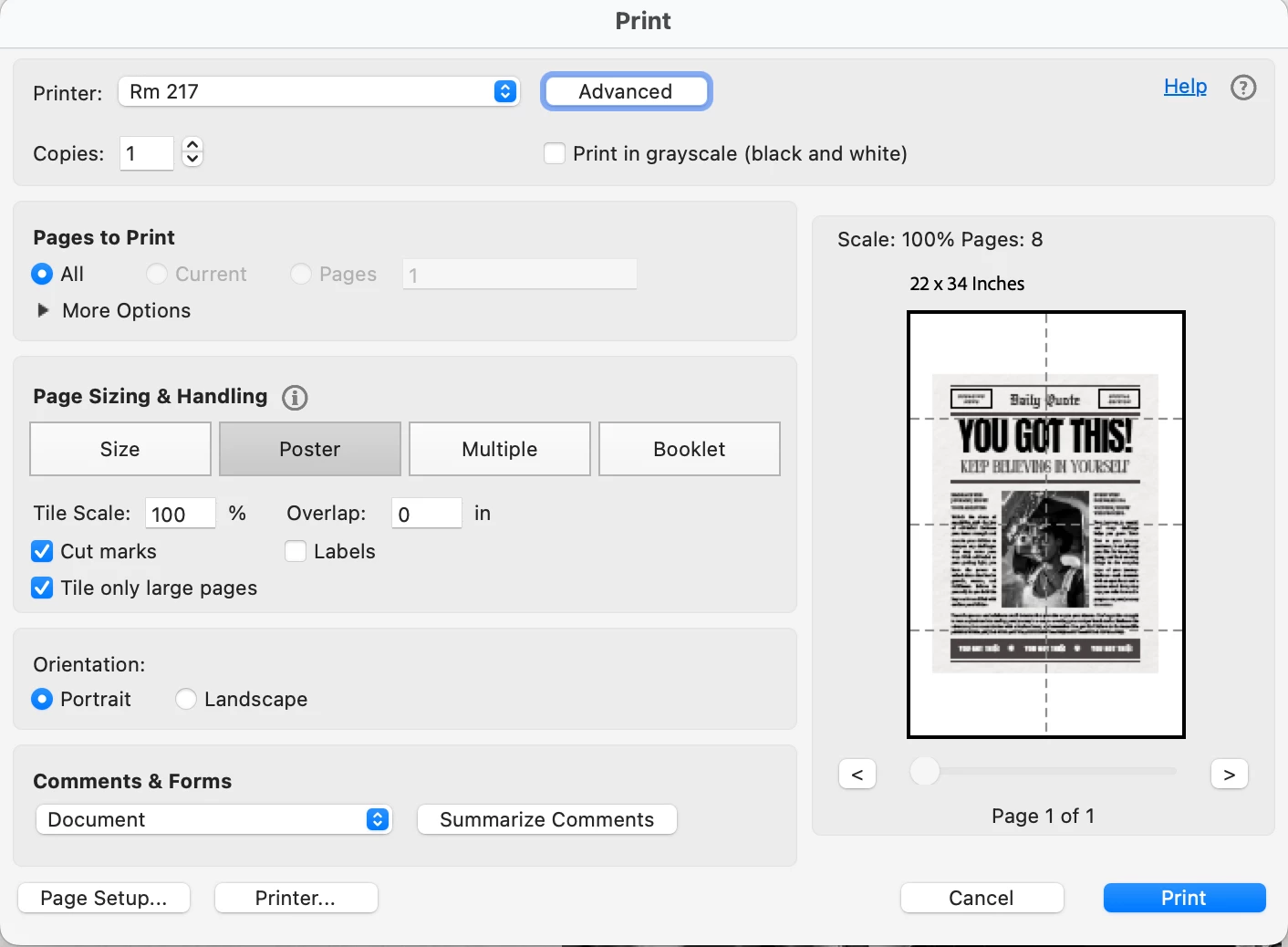
I've been at this for a few hours and I can't seem to find a solution.  I have a pdf that 22 inches by 34 inches. I'm trying to poster print, but all the printers I try reduce the print to one page.  I have a Mac running Ventura 13.0 and the latest Acrobat reader  version 2024.001.20615.

Before printing, I go to advance and deselect "Print As Image"  then I select Poster. Below is an image of the print window. I noticed on the right it says scale 100% Pages 8 and an image broken down to 8 pages but below that it says Page 1 of 1. Any help is greatly appreciated. Thank you 

I no
This topic has been closed for replies.

7 replies

Participant
September 4, 2024

6 months later issue still occurs.. I can't print more than one page..

maxwithdax
Community Expert
Community Expert
April 14, 2024

Have you tried printing the panels to PDF first? This would bypass your printer's option to force it back to one page.

Participant
April 15, 2024

I tried that and it didn't work!  

maxwithdax
Community Expert
Community Expert
April 28, 2024

So when you tried to Print to PDF you still get only 1 page output from the Print dialog? 

Participant
April 11, 2024

I'm having the same problem!!!!  I'm wasting tons of ink trying to figure it out.  Has anyone found a solution?


Adobe Employee
April 3, 2024

Hi @Ed36335745p3jn , Thanks for reporting this issue, We have logged a bug at our end for the same, and will resolve this bug soon.

Participant
April 11, 2024

Any updates on being able to print posters again?  Thanks!

JR Boulay
Community Expert
Community Expert
March 27, 2024

Try to revert to the Classic UI: https://community.adobe.com/t5/acrobat-discussions/acrobat-2023-how-to-revert-to-classic-gui-user-interface/td-p/14052807
Consider the "new Acrobat" as a beta version, many features are still missing or half-implemented.

Acrobate du PDF, InDesigner et Photoshopographe
Participant
March 27, 2024

It's not the interface that is the problem. The issue exists in the previous UI as well.

Participant
March 28, 2024

Yup, agreed. I tried to revert, and it still doesn't work. 

Participant
March 27, 2024

I'm having the same issue, and it is causing a major issue in my work process. Poster printing only prints as one page, and not to scale.


They do not allow a rollback to the previous version either. Please fix this adobe, or offer a solution.

Participant
March 28, 2024

A workaround I found was to use Excel or go to the PC. 

https://allthingsencaustic.com/print-image-multiple-pages/

Bernd Alheit
Community Expert
Community Expert
March 27, 2024

What happens when you print this page?

Participant
March 27, 2024

It prints the document on one page  rather than the 8 pages.