


WindyDave
Participant
February 19, 2019
Answered

Postscript Crashing since last update (Acrobat Pro DC)

  • February 19, 2019
  • 11 replies
  • 10107 views

Hi Guys,

Since the last update (2019.010.20091), my team and I have been having issues with our PDFs not postscripting, causing distiller to crash.

As background, we use another program (Nitro) to combine a range of documents, email messages, text files etc into a single PDF. We then open the PDF in outlook and save as a Postscript, and then use the postscript to create a usable file. The reason we use postscript is that not doing so interferes with another plugin we use for redacting information.

Prior to last week, which I can only attribute to the 2019.010.20091 update, this worked just fine. The key sticking point seems to be when an outlook .msg file has been converted to PDF by Nitro. (as in PDFs without those emails will postscript fine, emails with them in will crash)

We use Nitro because Adobe doesn't support bulk convert/combining outlook .msg files, and these are a substantial portion of the documents we deal with.

This is extremely frustrating, nothing has changed on our end in terms of process or software, other than Adobe breaking things.

Apologies if this is not in the right section, it's the one that made the most sense to me.


The error given is below:
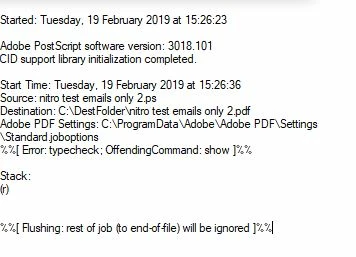
The problem occurs across multiple computers, with multiple combinations of documents, the commonality appears to be where the outlook files were involved.

This topic has been closed for replies.
Correct answer Dov Isaacs

Today, April 9, Adobe released an update to Acrobat 2015, Acrobat 2017, and Acrobat DC that fixes the Distiller problem that appeared with the last update.

Please update your copies of those Acrobat versions and the Distiller problems should be resolved!

          - Dov

11 replies

Meenakshi Negi
Community Manager
Community Manager
February 19, 2019

Hi WindyDave,

As you are using the Nitro to create PDFs and the workflow you have mentioned above, I cannot assure you anything on this right now.

You have mentioned that the postscript crashing only with the PDF which includes the outlook.ms files.

Would you please help us with more information on this issue?

- Please share any 2-3 sample PDFs created in Nitro on which the issue occurs and the postscript that you create.

- Share the exact steps you do to create the postscript of the PDF.

- Share the application version of  Nitro, Outlook, and Postscript software

-  What is the OS version installed on the machine?

- Let us know the exact workflow that results in a crash and how Acrobat comes in the scenario.

Please provide the details as asked above, I will check into this.

Regards,

Meenakshi

WindyDave
WindyDaveAuthor
Participant
February 20, 2019

Hi Meenakshi,

Alas I would use acrobat instead of Nitro if it did everything I needed it to do. (but anyway) To answer your questions:
System Information:

OS: Windows 10 Enterprise (version 1809 (OS Build 17763.195)

Nitro Pro 12.2.0.228

Adobe Acrobat DC 19.010.20091

Acrobat Distiller 19.10.20091315611
Outlook 2016 (16.0.4783.1000) 32 bit

Process used:

1) Source the email, save it to a local drive.

2) Use Nitro Pro to create a PDF from an outlook message file.
3) Open the resulting PDF in Acrobat Pro.
4) Export to > Postscript.
5) Double click on the .ps file to open it in Distiller. Distiller starts to process.
6) Distiller crashes.

There are a few more steps involved in our usual workflow, but the only bit that breaks in the process are .msg files.
I have tried a few different variations (emails with images, emails in plain text format, emails with and without signature blocks) and all fail to postscript.

I've uploaded some sample emails (original message, pdf, and postscript)

https://www.dropbox.com/sh/73swojaukydtno6/AAB7JqQqy6TsSXJ0sQevlYPVa?dl=0

The current workaround is to Print the resulting PDF (at step 3 above instead of exporting to PS) using Adobe PDF driver, but this seems rather tedious to do.

Meenakshi Negi
Community Manager
Community Manager
February 20, 2019

Thank you for sharing the information.

Please allow us some time to look into this. We will let you know if we need more information.

Regards,

Meenakshi