


Participant
April 29, 2024
Answered

Preflight error message

I kept getting the follow error msg when attempting to prefilght a PDF document:

Could not copy file C:\Programme File\Adobe Acrobat DC\plug_ins\Preflight\OutputIntent\CoatedFOGRA39.pdf, C:\Users\KrissHolliday\AppData\Roaming\Adobe\Acrobat\Preflight Acrobat Continuous\OutputIntent\CoatedFOGRA39.pdf: Access is denied


Any suggestion pls.
This topic is closed to new replies. Start a new post to keep the conversation going.
Kriss370554360xlvCorrect answer
Participant
April 30, 2024

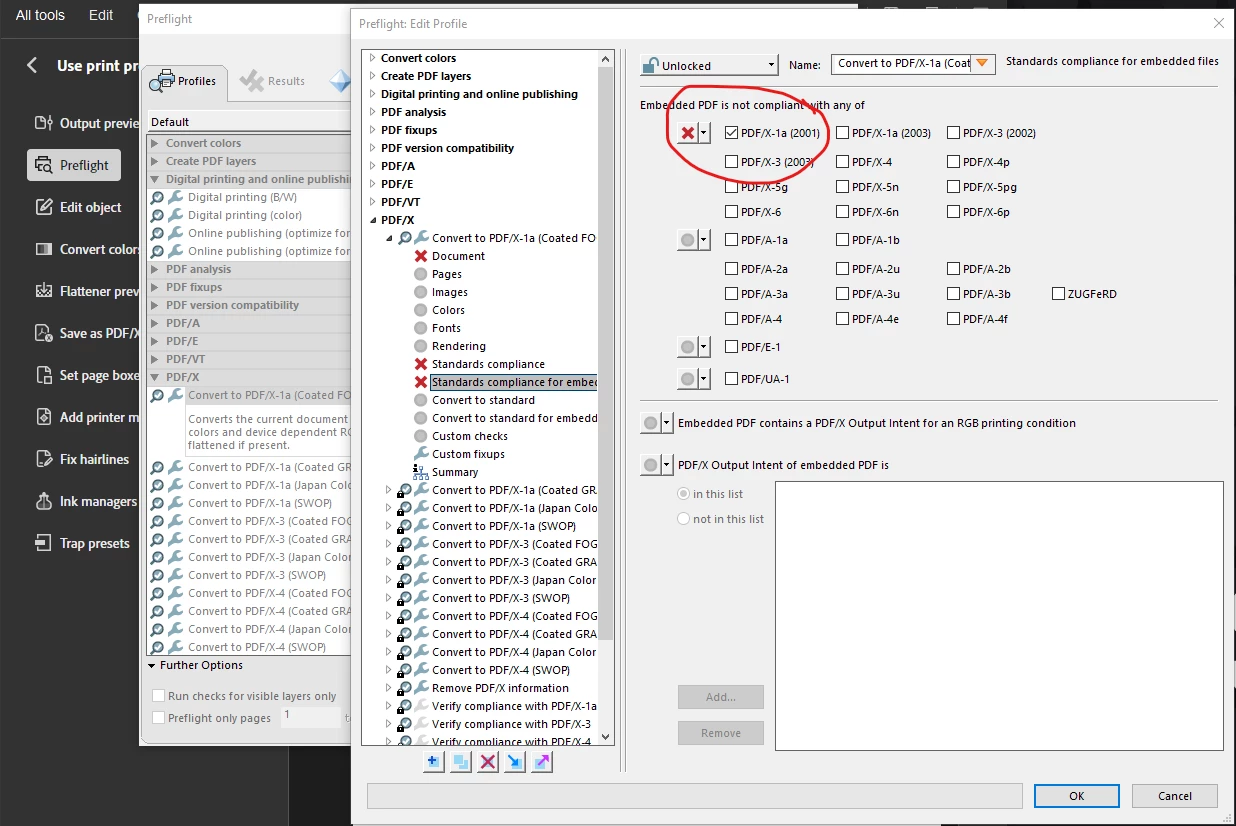
Hi Karl – thank you for thanking the time to post, it turns out the issue was within Preflight: edit profile, under the Standards compliance for embedded files, all options here were unselected, after selecting the PDF/X-1a I was able to run the preflight.


3 replies

Karl Heinz  Kremer
Community Expert
Community Expert
April 29, 2024

When you look at the two paths that are specified, what are the permissions on the original file in "Program Files" and the folder it is trying to copy to, or the existing file if it already is in that folder? 

Translate
Kriss370554360xlvAuthorCorrect answer
Participant
April 30, 2024

Hi Karl – thank you for thanking the time to post, it turns out the issue was within Preflight: edit profile, under the Standards compliance for embedded files, all options here were unselected, after selecting the PDF/X-1a I was able to run the preflight.


Translate
Karl Heinz  Kremer
Community Expert
Community Expert
April 30, 2024

Thanks for the solution. This is a new one for me, I will try to remember it for next time. 

Translate