Inspiring
June 26, 2024
Answered

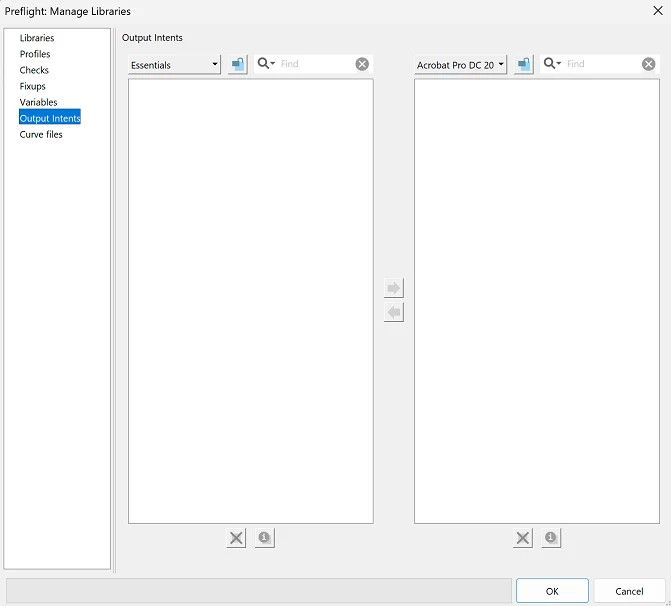
Preflight libraries empty, no output intents: Cant save as PDF/A. Help please...

  • June 26, 2024
  • 1 reply
  • 713 views

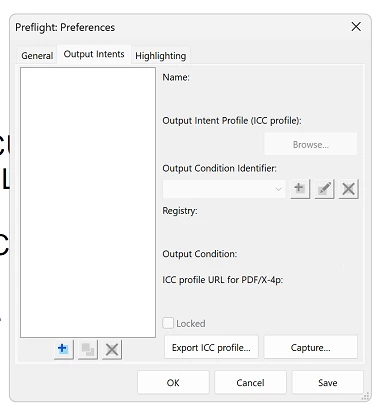
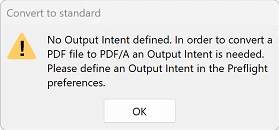
My preflight libraries are empty, no output intents at all: Cant save as PDF/A. 

What I've tried:

  • Uninstall of adobe with the cleaner tool and uninstalled creative cloud. (Didnt work)
  • Updated it to 24.02.20687. (Didnt work)
  • Ran as Admin account. (Didnt work)
  • Manually reset preferences through the roaming appdata file. (Didnt work)
  • Repaired installation through adobe. (Didnt work)
  •    


Correct answer Kris38274894ji84

Found a solution that works:

  1. Turn off "Enable protected mode at startup"
  2. Close Adobe
  3. Delete the folder Preflight Acrobat Continuous (%APPDATA%\Adobe\Acrobat\Preflight Acrobat Continuous
  4. Open Adobe
  5. Turn back on "Enable protected mode at startup"

1 reply

Kris38274894ji84AuthorCorrect answer
Inspiring
June 26, 2024

Found a solution that works:

  1. Turn off "Enable protected mode at startup"
  2. Close Adobe
  3. Delete the folder Preflight Acrobat Continuous (%APPDATA%\Adobe\Acrobat\Preflight Acrobat Continuous
  4. Open Adobe
  5. Turn back on "Enable protected mode at startup"
kmurray_1
Inspiring
March 31, 2025

I've been searching for weeks for a solution to this issue. Thank you so much!!!