


New Participant
December 5, 2022
Answered

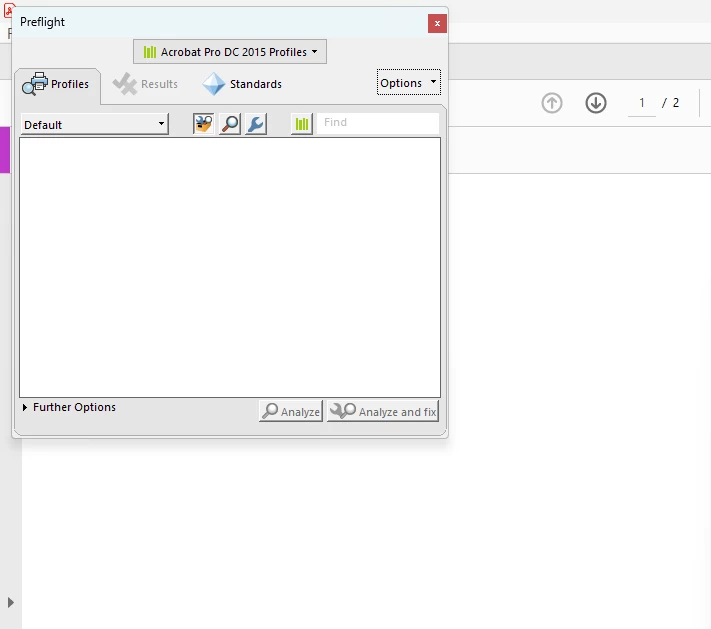
Preflight tool opens but empty

  • December 5, 2022
  • 10 replies
  • 24084 views

Hello, I have Acrobat Pro 2015 64 bit on a Windows 11 machine.

When I click the preflight icon it opens the box but it is empty. It has the 3 icons at the top but if I click one a window poops up that says "unable to load user preferences" or something to that effect and it crashes Acrobat. I've included a screenshot of the blank preflight box. This tool worked flawlessly on my previous computer which had W10.


I have all available updates, I've uninstalled and re-installed and also tried to repair the installation. 


Any help is greatly appreciated.
Correct answer Amal.

Hi there


Hope you are doing well.


The new version of Adobe Acrobat (23.01.20143), addressing this issue is now available. Please update the application from the Help menu > Check for updates and reboot the computer once.

You may also download the patch manually from the link https://www.adobe.com/devnet-docs/acrobatetk/tools/ReleaseNotesDC/index.html


Let us know how it goes.


Regards

Amal

10 replies

New Participant
February 8, 2025

its 2025 Feb 9 and the issue still exist on windows 11. 

New Participant
May 20, 2025

It's 2025 May 20 - and the issue still exist here. All guides on this thread has been followed. All updates in place. We have two employees on exact same version, but no preflight content at one of them.

Is there any way to get professionel assistance on this one?

New Participant
May 13, 2024

did you get this issue resolved?  I have the same problem.  uninstalled and reinstalled didn't help.   the defaut preflight seting is empty

New Participant
May 13, 2024

I did get it fixed, but TBH I tried so many things I dont know what actually fixed it. We have Pitstop Server also, so I may be linking to profiles there.


Cheers,

Amy


[P.I removed by Moderator]

Amal.
Community Manager
Amal.Community ManagerCorrect answer
Community Manager
April 12, 2023

Hi there


Hope you are doing well.


The new version of Adobe Acrobat (23.01.20143), addressing this issue is now available. Please update the application from the Help menu > Check for updates and reboot the computer once.

You may also download the patch manually from the link https://www.adobe.com/devnet-docs/acrobatetk/tools/ReleaseNotesDC/index.html


Let us know how it goes.


Regards

Amal

New Participant
April 12, 2023

I just installed the update, confirmed that I'm now running 23.01.20143, but my preflight is still blank.  Has anyone had success with the update?

New Participant
June 20, 2023

No I have not. I'm running Windows 11, Adobe 2015 DC Pro... I followed the instructions given by someone to create a 'new library' for Prepress, Color and Transparency' by 'managing libraries'


But when I opened the preflight panel, it was blank, which was an issue since I need to use it for work. And don't ask my thought process but finally I tried hitting the options button on the right-hand side. Then I clicked manage libraries. I needed to use the PDF Standards library, which of course, was blank. So, I chose it and hit the little plus button on the bottom, which was the first square option. Then it created a copy of this library which, somehow, was not blank. From what I can tell, it has exactly everything in it that the original library should. Only, it actually shows up and is not blank. Hope this helps!

New Participant
February 20, 2023

Hello, I've had a terrible time with Adobe since first posting this and my preflight still does not work.


I had an Adobe employee email me from a bogus email address and they tried to scam me into buying a lifetime version of Pro 2022 using a PayPal link but I noticed their email didn't end in Adobe.com. They were pestering me until I called customer service and told Adobe what was going on then miraculously the emails from that person ceased.


Then talking to one of their IT people over the phone he told me it wasn't the program and I had a corrupt install of Windows so we needed to re-install Windows - guess what, this didn't fix it either.


So I went out and bought a brand new Dell with W11 Pro and when I installed Acrobat DC it's doing the same thing and crashing my computer.


Disabling Sandbox didn't fix it for me but maybe I need to delete the User Preferences folder that was mentioned, however I can't find that folder. (%APPDATA%\Adobe\Acrobat\Preflight Acrobat Continuous)

New Participant
March 1, 2023

Hi! I'm no tech genius at all, and I was having this exact issue. I read through these posts, and tried any solution mentioned, and nothing worked. And I finally accidentally solved it myself, so maybe this method will work for others? But when I opened the preflight panel, it was blank, which was an issue since I need to use it for work. And don't ask my thought process but finally I tried hitting the options button on the right-hand side. Then I clicked manage libraries. I needed to use the PDF Standards library, which of course, was blank. So, I chose it and hit the little plus button on the bottom, which was the first square option. Then it created a copy of this library which, somehow, was not blank. From what I can tell, it has exactly everything in it that the original library should. Only, it actually shows up and is not blank. Hope this helps!

New Participant
March 1, 2023

Also, after doing this, all the other libraries started showing up as well! 

Participating Frequently
January 8, 2023

As of January 2022, this is still an issue. I have no way to convert a PDF from CMYK/RGB to Grayscale, nor to make any other changes. Preflight is a decades-old feature of Acrobat DC/Pro. What the heck is going on with Adobe? At this rate, I'm going to install my ancient copy of Adobe CS2 on an old PC just to use Preflight. 

Participating Frequently
January 8, 2023

Forgot to mention...I'm on a PC using Windows 12, so it's not just a Windows 11 issue. 

Participating Frequently
January 18, 2023

Windows 12????

New Participant
January 5, 2023

I'd like to chime in too - I have the same issue!  Windows 11 - uninstalled and reinstalled Acrobat - I had the same errors Ivo5C8D mentions with Preflight and then all of Acrobat freezing.  Just wanted to be sure this thread stays active!


New Participant
December 21, 2022

Having the same issue here. I am working with Adobe Support. So far it seems to be affecting the Windows 11 22H2 machines.

Participating Frequently
January 18, 2023

it seems that it is the 64 bit version of acrobat which is affected by the problem because my 32 versions work very well

Known Participant
December 8, 2022

Hello!
I have exactly the same problem - clean install didn't help and neither removing all preferences. I used Creative Cloud Cleaner tool and that didn't help either. If I start selecting PDF standarts, Acrobat Pro DC 2015 etc., warning window with Unable to copy the user specific preferences pops up and Acrobat goes into NOT RESPONDING...

All of this is very frustrating as I need to outline lots of PDF's every day!
I am also on Win 11 64 bit.

Amal.
Community Manager
Community Manager
December 12, 2022

Hi there


We are sorry to hear that. Would you mind collecting the Adobe CC logs https://helpx.adobe.com/creative-cloud/kb/cc-log-collector.html and procmon logs (Win) https://www.adobe.com/devnet-docs/acrobatetk/tools/Labs/acromonitor.html and share them via document cloud link as described here https://helpx.adobe.com/document-cloud/help/sharing-pdfs.html so that we can isolate the issue for the fix.


Waiting for your reply


Regards

Amal

Participating Frequently
December 8, 2022

I contacted Adobe for 1 month and yet nothing helps, the assistance does not seem to be aware and seems lost to solve the problem.
not very serious.

New Participant
December 8, 2022

Thank you all for filling me in. I'm guessing it only happens with Windows 11 machnes? My W10 worked fine but I no longer have any machines running W10. I know the tool still works on older Mac's as well. I Have a printing company and we need to use these tools almost daily, it's a big hassle without it.

Participating Frequently
December 8, 2022

I work on Win 11 and I have the impression that this is a problem for Adobe. But it seems to be recent because I've been on Win 11 for quite a while and I think the latest update has a bug.
I have a machine on Win 10 and no worries.

stevent76891219
Participating Frequently
December 5, 2022

It seems many of us are having this same issue, with no known fix. I did contact Adobe last week and FWIW, there was some inidication that they may be working on a resolve. It's anyone's guess how long this fix may take, though, which is a huge problem for those of us who use preflight often. For me, it's convert fonts to ouline which is essential.

stevent76891219
Participating Frequently
December 7, 2022

I don't want this issue to be forgotten. Prefilight is not working in Acrobat DC as all profiles are blank when chosen. We need this fixed or at least some feedback on what Adobe is doing to fix the issue.