

Prepare Form: How to bring Formulas from Word Embedded Excel Tables to Acrobat Text Field Properties
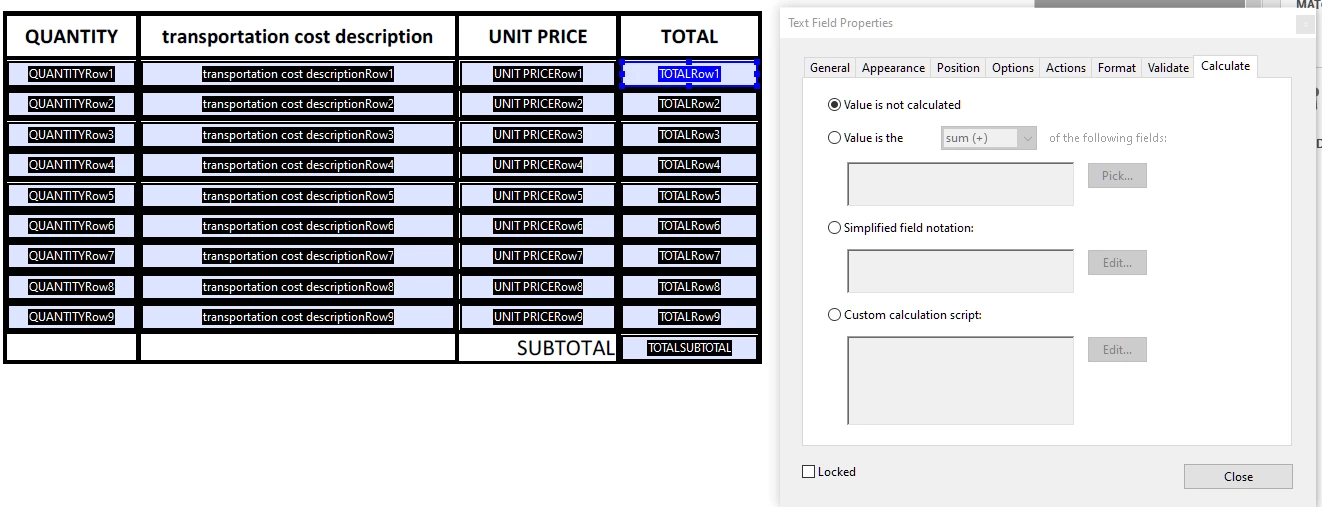
I have a Word 365 document with embedded Excel tables that have simple multiplication in each row and a sum of all row products as shown below (Fig.1). When I create a PDF from the word doc, then use the Prepare Forms Tool, Acrobat autopopulates the table with form fields as shown below (Fig.2). My goal is to have my client enter the quantities and cost in each form field and then for the totals to autocalculate.
Unfortunately when I creat the PDF, I lose the (Qty x Unit Price) formulas in each row Total cell and Subtotal (Sum of Row 1 Total + Row 2 Total + ...Row 9 Total - shown in Fig 2) and I have to manually use the Calculate Tab in the Form Field formatting tool (Fig.2) to create form field calculations in the appropriate cells. This is tough because I have many tables that I have to do this with and it'll take a very long time.
Any ideas out there?
Fig.1
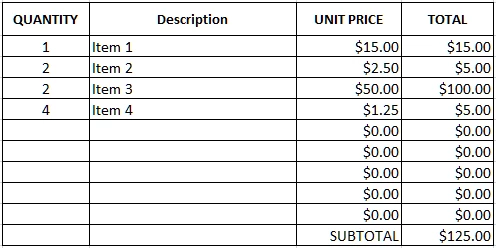
Fig.2
 AdChoices