

JR Boulay
Community Expert
Community Expert
October 3, 2026
Question

Prepare Form tools is in the wrong place

  • October 3, 2026
  • 8 replies
  • 34 views

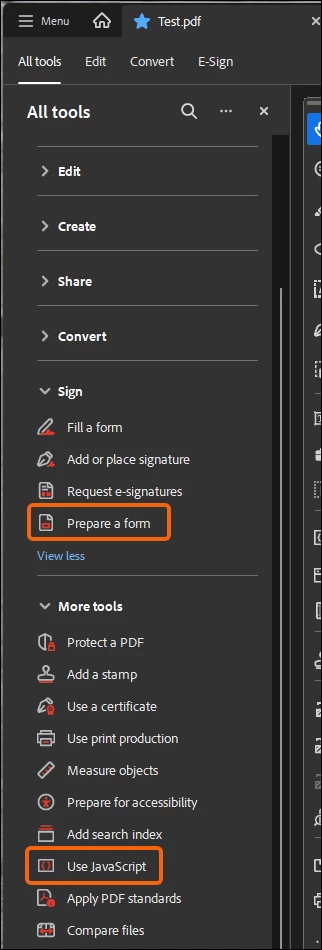
Why is “Prepare Form Tools” located in the “Sign” Tools?
It doesn't make sense, especially since “Use JavaScript” is located in “More Tools.”

These are two inseparable tools and they aren't necessarily related to signatures, far from it.


Why not consult users and seek their input instead of forcing them to use an interface that defies common sense?

Thank you.


    8 replies

    Karl Heinz  Kremer
    Community Expert
    Community Expert
    October 3, 2026

    Hi JR,


    You’ve been doing this probably as long as I have, so your guess regarding the reason is just as good as mine ;) If it were up to me, we works still be using the Acrobat 9 UI (unless I feel a bit nostalgic, and then it would be Acrobat 5.5). As long as Adobe will allow me to do that, I will be using the old UI when I need to get some work done. 

    Dave Creamer of IDEAS
    Community Expert
    Community Expert
    October 3, 2026

    I started with v3, but I did like the 9 UI too. 

    David Creamer: Community Expert (ACI and ACE 1995-2023)
    Karl Heinz  Kremer
    Community Expert
    Community Expert
    October 3, 2026

    I used to have a box of Acrobat 1 that I lost during an office move, but I started to actually “work” with Acrobat with v3 on a SunOS Solaris box. Long time ago… 

    Dave Creamer of IDEAS
    Community Expert
    Community Expert
    October 3, 2026

    How did you get the category listings? I don’t have them on my systems.

    David Creamer: Community Expert (ACI and ACE 1995-2023)
    JR Boulay
    Community Expert
    JR BoulayCommunity ExpertAuthor
    Community Expert
    October 4, 2026

    I don’t know, I guess they come with the latest update.

    I didn't notice them until the day before yesterday, because I wanted to know the status of the fix for the bug that prevents you from moving tools by clicking and dragging.

    Spoiler: I still can't move them by clicking and dragging…😱


    Acrobat Pro 26.00221931 for Windows

    Acrobate du PDF, InDesigner et Photoshopographe
    Dave Creamer of IDEAS
    Community Expert
    Community Expert
    October 4, 2026

    I checked for updates on both my Mac and Windows systems. I’m up to date. I looked at the preferences but didn’t see anything related. Weird...

    David Creamer: Community Expert (ACI and ACE 1995-2023)