chelseap66012303
Participant
April 9, 2018
Answered

Preparing a Form

  • April 9, 2018
  • 1 reply
  • 380 views

I am preparing a form and I have fields where text can be entered but when I try to do a test and fill this form out on my phone it cuts off half my writing. And when I try to email it back to myself it shows half the text. I have tried making the text box bigger and that doesn't seem to help so I'm not sure where the problem lays. But I need this PDF to be accessible by phone to be filled out. How can I fix this issue?
This topic has been closed for replies.
Correct answer AnandSri

Hello Chelseap,

We apologize for the inconvenience caused, as per the description above, you are getting half of your writing in the form fields, is that correct?

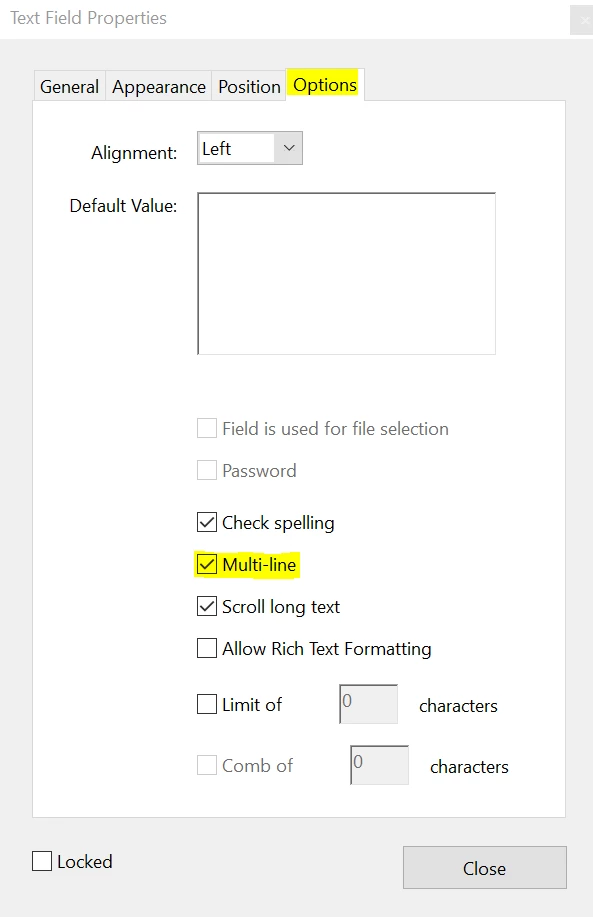
Please choose the option Multi-line in the Text Fields Properties, navigate to Text Fields Properties>options>Select the Checkbox of Multi-line and see if this makes any changes.

You may also refer to PDF form field basics, Adobe Acrobat

Let us know how it goes and share your findings.

Regards,

Anand Sri.

1 reply

AnandSri
AnandSriCorrect answer
Legend
April 9, 2018

Hello Chelseap,

We apologize for the inconvenience caused, as per the description above, you are getting half of your writing in the form fields, is that correct?

Please choose the option Multi-line in the Text Fields Properties, navigate to Text Fields Properties>options>Select the Checkbox of Multi-line and see if this makes any changes.

You may also refer to PDF form field basics, Adobe Acrobat

Let us know how it goes and share your findings.

Regards,

Anand Sri.