


Participant
September 24, 2025
Question

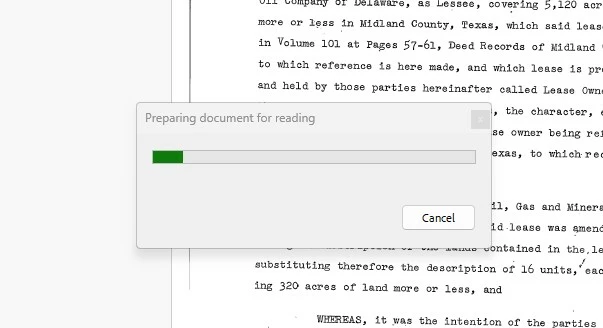
"Preparing document for reading"

  • September 24, 2025
  • 1 reply
  • 184 views

So, I have had about 100 chats with tech support. None of them seems to know what to do. I have gone through all the posts in the community. NONE of the steps suggested work. Every time I open a document, a pop-up window appears, displaying "Preparing document for reading" with a progress bar. The progress bar freezes about 1/3 of the way, and I then have to close the window manually. This occurs 50-60 times a day and is VERY disruptive to my workflow. Sometimes, I'm able to close it with no further interruptions; other times, it repeatedly pops up in the same document. Someone please help, I have tried every .pdf program out there and all of them absolutely SUCK. 


1 reply

CatherresAuthor
Participant
September 24, 2025

I also noticed that this has been a known issue for at least 12 years. Geez, Adobe, how long does it take you people to address and fix an issue? I could have taught myself to code by now and fixed this. 

AnandSri
Community Manager
Community Manager
September 25, 2025

Hello @Catherres


I hope you are doing well. Thank you for reaching out, and I am sorry for the trouble you had.


This behavior is typically caused by:

  • Screen Reader settings are being enabled or misconfigured.
  • PDFs with complex structures, scanned content, or missing accessibility tags.
  • Acrobat is attempting to prepare the document for assistive technologies.


1. Launch Adobe Acrobat Pro.
2. Go to Preferences

Click Menu> Preferences (Windows) or Acrobat > Preferences (Mac).

3. Navigate to Reading Settings

In the left-hand panel, select Reading.

4. Change Screen Reader Options

Under Screen Reader Options, set:

Page vs Document: Choose “Only read the currently visible pages” or “Do not read the document”.
Confirm before tagging document: Uncheck this box.


5. Save and Restart

Click OK to save changes.
Restart Acrobat.


This should prevent the pop-up from appearing every time you open a document.


Let us know how it goes.

Thanks for your time and cooperation.

Regards,

Anand Sri.

simplyfries
Participant
February 18, 2026

🤞 … crossing fingers that this works… 🙌 

Thank you either way!