
meadows.enk
Inspiring
September 13, 2023
Answered

Prevent auto-OCR when opening Edit PDF menu

  • September 13, 2023
  • 3 replies
  • 2746 views

I have a set of scans in separate files that I need to crop. They are image scans without OCR, and they do not need OCR. I just need to crop them, but every time I open the Edit PDF menu to choose the Crop Page tool, Acrobat automatically runs OCR on every file, which causes a forced delay while I wait for this inefficient app to run its task. Is there any way to prevent Acrobat from ever running OCR before I ask it to? In the past, this was the default. Now it doesn't seem like there's any way around it.
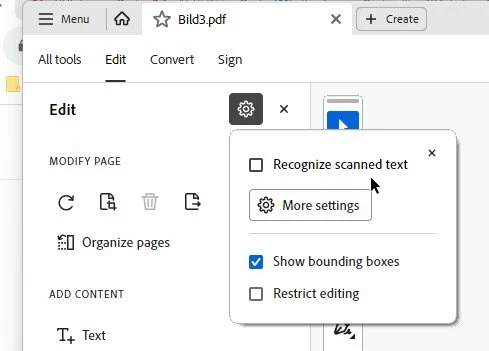
Correct answer Bernd Alheit

You can disable OCR

3 replies

cauthier721
Participating Frequently
June 20, 2024

I can't believe that there isn't an option in preferences to check/uncheck OCR. Seems like a simple solution vs having to hit ESC every time I click edit for EVERY page. 😕😕

Participating Frequently
January 14, 2025

HI All,   this is a pain in the  rear ,  and now even when I UNTICK recognize text ,  make a change and click control S to save the file  the  program  DOES THE SAME THING  when trying to save the changes or edited  file,  THIS IS SOOO frustrating ,  

KramKram
Participant
December 5, 2023

I've had the same frustration without an option to turn off the process, but as you would have probably found by now - you can press ESC as soon as it starts OCR conversion to halt the process.  If you're then cropping the document, it should behave if you don't jump around to other pages in Edit mode afterward.   Certainly not an acceptible change by Adobe compared to past control over documents, but a current workaround. 

Bernd Alheit
Community Expert
Bernd AlheitCommunity ExpertCorrect answer
Community Expert
September 13, 2023

You can disable OCR

meadows.enk
Inspiring
September 13, 2023

That doesn't work. Even when I deselect that, subsequent files still default back to auto OCR