
Participant
March 7, 2022
Answered

Preview Pane File Not Found Windows 10

  • March 7, 2022
  • 15 replies
  • 17555 views

Today, we started experiencing this issue with the preview pane when clicking on PDFs in the office:
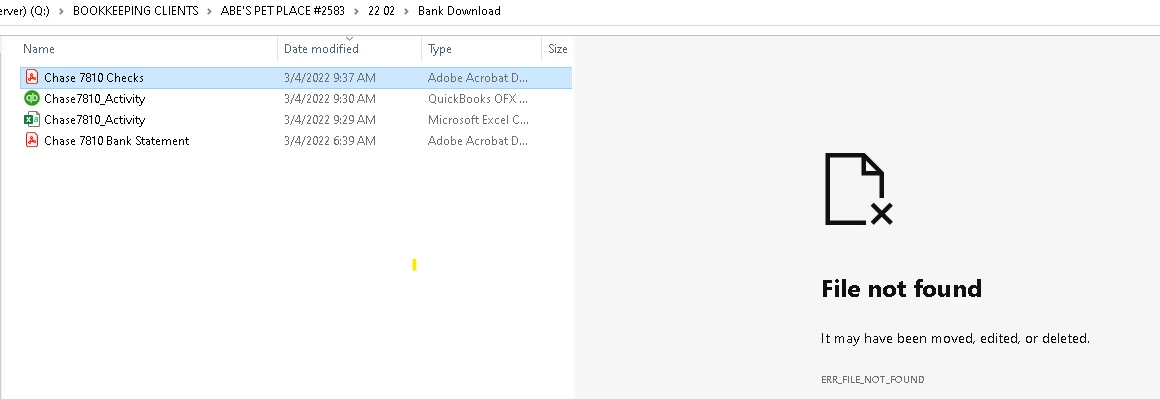
The PDF opens fine, but we can't preview. I already restarted the comptuer and unchecked and rechecked the preview settings withing adobe. All looks good. Please help. 

This topic has been closed for replies.
Correct answer jmc.ylci

Had the same issue today with some PDF attachments not previewing in Outlook, checked for updates for Adobe Reader and updated to the latest version out today 2022.001.20085 and the preview function worked again.

15 replies

Participant
March 16, 2022

Hi there - We had the same problem, and we figured out that it was related to having the character "#" in the folder path. It looks like in your screenshot you have the same issue - there is a # in one of the folder names. I would remove it and try again.

Participant
March 16, 2022

any update on this issue?

support is HORRIBLE!!!!

updated users and that resolved the issue for a day now its back

preview pane is using adobe dll to provide preview so it is somthing withh adobe.

as others mentiond the issue is not with all files my test results were random.


Participant
March 16, 2022

Hi there - We had the same problem, and we figured out that it was related to having the character "#" in the folder path. Maybe you have the same issue, or you have another special character in the folder path?

Participant
March 9, 2022

I just had a user report this to me yesterday.  It doesn't happen to every pdf file only certain ones.  Also the files that wont preview open in adobe with no issues at all.  I did notice that when I went into properties on the files in question in adobe it was showing an older version number for the file created than the ones that would work in preview.  Dont know if that helps narrow anything down.

Participant
March 9, 2022

my users are running Adobe Acrobat Pro 11 and they are all fully up-to-date btw

jmc.ylciCorrect answer
Participant
March 7, 2022

Had the same issue today with some PDF attachments not previewing in Outlook, checked for updates for Adobe Reader and updated to the latest version out today 2022.001.20085 and the preview function worked again.

radzmar
Community Expert
Community Expert
March 7, 2022

The preview windows is a function of Windows not Acrobat. It may got broken by somthing like an update or so. Check Microsofts knowledge base for solutions.