

Question
Print as Image problems
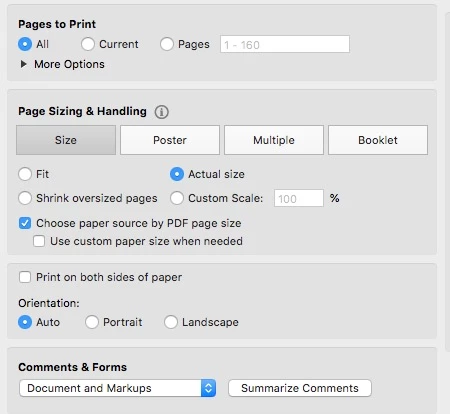
I have posted a pic of my print settings. Macbook, High Sierra, Adobe Pro DC, Brother 5200DWT printer. The PDF files I print are always a mixture of ltr and lgl pages, which is why I select - Choose paper source by PDF page size.
On page 24 I was getting a sheet of paper with an error - IO Error. The answer I found was to select - Print As Image. This seemed easy. But when I selected that, my print settings were ignored. In my tests, I found that
- the size of the first page of the document (ltr or lgl), was what the entire document was printed on.
- Sometimes the image would not fully print on the page.
Why is the reason for both 1 and 2?
Can both 1 and 2 be fixed?
Thanks
 AdChoices