Participating Frequently
November 7, 2023
Question

Print Preset File Location - Adobe Acrobat - Macbook Pro

  • November 7, 2023
  • 2 replies
  • 1383 views

Hello, 


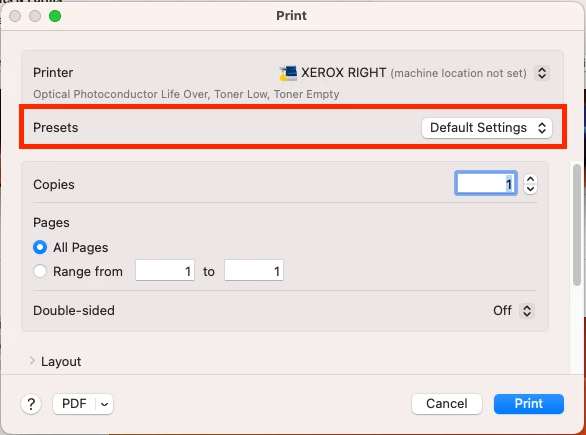
Where is the export file located on the hardrive that contains all Acrobat Print Presets so I can transfer them from one macbook to another. Using Ventura and Acrobat 23.0. These are going to be the custom settings highlighted below. Thank you. 
 

This topic has been closed for replies.

2 replies

Brad @ Roaring Mouse
Community Expert
Community Expert
November 7, 2023

The Presets you are indicating here are not Acrobat Print settings, but System level settings for your printers. This is an Apple thing and will be stored in preference files located according in your ~/Library/Preferences/

Look for items named starring with "com.apple.print.custompresents... ". There will be multiple items. Some apply to all printers, some may be model-specific.

That being said, how possible it is to merely copy these from an old Mac to new one is iffy at best. I don't recommend it. as you may very likley overwrite settings that currently already exist in your new Mac. It would be better to recreate them on your new Mac to match, in your Print Settings.

try67
Community Expert
Community Expert
November 7, 2023

I believe these are .joboptions files. I'm not sure, but think that on a Mac they will be located under:

/Applications/Adobe Acrobat <VERSION>/Adobe Acrobat Pro.app/Contents/Resources/Settings

Or you could just search the system for *.joboptions ...