Participating Frequently
February 6, 2020
Question

print problem

  • February 6, 2020
  • 10 replies
  • 7436 views

Hello dear readers,


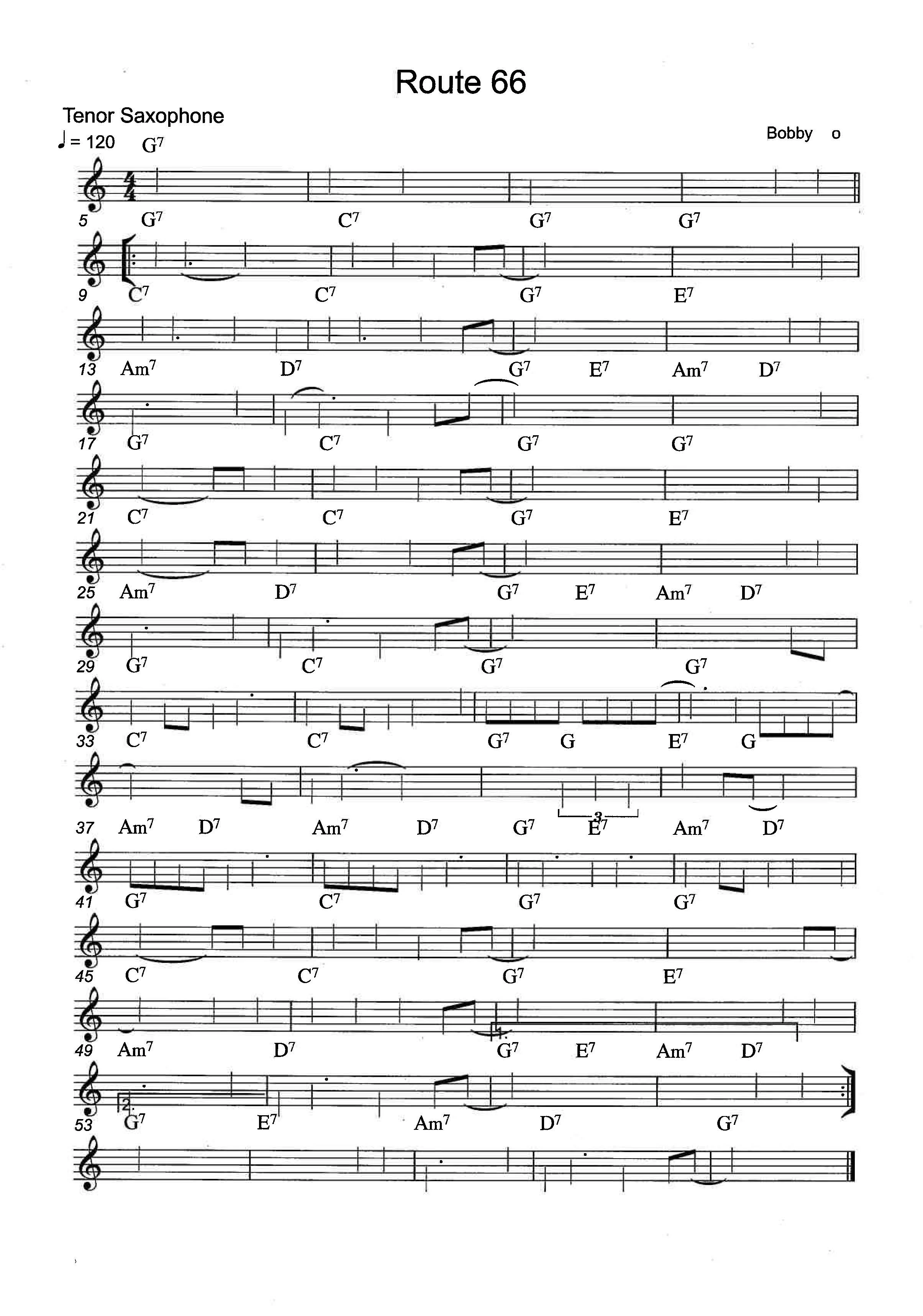
Does someone know a solution to this print problem. I make music scores in the software Sibelius but when I try to print a score with pdf the print isn't readeble

This topic has been closed for replies.

10 replies

Participating Frequently
November 25, 2022

Hi Aldo,


Thank you very much!

Regards...

Participant
November 25, 2022

I found a definitive solution on a friend's MacBook Pro M1, exported from Sibelius Ultimate 2022.

He "Saved as other" PDF/A (Archivable) and done. It says that you cannot edit the score, but for that purpose we have Sibelus 😁.

Cheers, 

Participant
March 28, 2021

I use Sibelius Ultimate on a Mac with Catalina. PDF files created in Sibelius Ultimate (using default fonts) do NOT print in 

either Adobe Acrobat or Adobe Acrobat Pro on a MAC (the noteheads do NOT print).

This is NOT the case for PDF files created by rearlier versions of Sibelius like Sibelius 7 and Sibelius First 7.

If I save the Sibelius Ultimate file in an older Sibelius format, such as Sibelius First 7, and then create a .pdf file using the older version of Sibeilius, then the resulting pdf file will print correctly using Adobe Acrobat.


However, the Sibelius Ultimate pdf file WILL PRINT CORRECTLY  on a MAC using any of the following:

1) The Sibelius Ultimate app itself

2) The MAC Preview app

3) The Safari App

4) The Google Chrome App


If I open the pdf file using (2)  (3) or (4) above, I can print the file correctly.

I have NOT yet tried to experiment with changing the default font for noteheads.

Participant
March 29, 2021
On a Mac, the Preview app works as well.


Rick Sacks
rixax@rixax.com
Participant
March 15, 2021

On a mac, Premiere works. Adobe, even with 'save as' does not. I have yet to update Brother firmware and install the latest Sibelius update. 

Participant
March 15, 2021

Sorry about my  previous comment I meant Preview not Premiere. 


On a mac, PREVIEW works. Adobe, even with 'save as' does not. I have yet to update Brother firmware and install the latest Sibelius update.

Dave__M
Community Expert
Community Expert
March 15, 2021

Reading back in other responses, it seems as if you are not alone with this issue happening in Sibelius.  Have you visited their support page (assuming they have one)?  I also wonder if there isn't a patch available now, or one in development since this problem is not isolated to just you.

My best,

Dave

Dave__M
Community Expert
Community Expert
February 22, 2021

I would think that Sibelius installs with some custom fonts that are used in the formation of notes on the staff.  I don't have it installed on this computer, so I can't check.  But if there is an option to embed all fonts in the PDF output, it might help.  That way it would reproduce the notes on a different machine, in theory.

My best,

Dave

Participant
March 15, 2021

Dear Dave,

Have you ever seen Sibelius do this before? I just exported my Sib 8 score as a PDF. It all looks perfect except for this one page, which is actually about 4 pages crammed into one, layer upon layer 😞

I have no idea how to fix it and am not even sure I have seen any other reports of such a thing happening.

Any suggestions for me?

Thanks

Nina


Participant
March 15, 2021

Did you try opening it in Preview? Not adobe.

Participant
December 4, 2020

This is what works for me using SIbelius Ultimate version 2020, Adobe Acrobat Reader 2020, and a MacBook Air 2020.

1) Export a PDF file from Sibelius

2) Open the PDF file in Adobe Acrobat Reader

3) In the Adobe Reader, use SAVE AS and save the file as an Adobe PDF (don't have to change the name, but say REPLACE

    if you use the same name)

4) Close the file in Adobe Reader

5) Re-open the newly saved file in Adobe Reader

6) On my gear, the PDF file now prints correctly


Apparently, when you save a file in Adobe Reader via the Save As function, something about the file gets changed, and the printing issues with the Sibelius created PDF file seem to go away. at least for me.


Participant
December 25, 2020

Hi All,


I am having the same problem: PDF's exported from Sibelius Ultimate look fine in Adobe, but print without any noteheads! As others have mentioned, I can print fine from Preview. But clients are unable to print from Adobe and this is a serious problem for me! (I was also informed that I submitted to a composition competitions where the jurors just rejected my score because they couldn't see the print out! Sigh.)


The last post by Paul5E90 recommended re-saving in Adobe, but this doesn't work for me. And I tried all the various kinds of "save as" options. Does anyone have other ideas?


Another person mentioned having irregular font embedded in the Sibelius file, but I don't have anything out of the ordinary. Just the standard default score preferences in the latest version of Sibelius Ultimate (Version 2020.12).


Thanks for any help!

asakoh46407721
Participant
January 2, 2021

I have the same problem - no note heads, some texts are missing, missing page numbers etc. I can print fine using Preview. I have the latest Sibelius Ultimate, and the macOS Catalina, version 10.15.7.

Please advise!

hank you very much.


Participant
October 11, 2020

Hi, I have exactly the same problem. I recently migrated to a new Mac computer, upgrading from Sib 7 to Sib Ultimate. I was running the same Mac OS on my old computer as this new one - Catalina. The PDF exports of my Sibelius files look fine on screen, but when I print the scores, the noteheads are missing. Has anyone solved this problem? Seems to be a Sibelius Ultimate problem as Sibelius 7 was fine with PDF export to Epson XP-6100 printer.

Participating Frequently
October 15, 2020

I don't think it's a sibelius problem. The PDF's i created where the noteheads don't print properly from Acrobat actually do print if I open them in google chrome and print them from there. They also print fine in Preview, and as others have said, look fine on screen.

Participant
October 15, 2020

thanks for this tup GraigEarle I will try from Preview - annoying to have to move the files from paid Acrobat when score compiling etc.

Legend
September 28, 2020

Just checked again … my .pdf displays correctly in Acrobat, prints correctly, and opens without problems in Illustrator: so I don't know what the problems were I used to have. Sample available if that will help.

Legend
February 10, 2020

Using different score-writing software, I have (very occasionally) had problerms trying to edit the output .pdf in Illustrator. I vaguely remember something about fonts, as though Acrobat couldn't find the font used for the note-heads – but it hasn't happened for a long time, so I can't give clearer information.

Dov Isaacs
Legend
February 6, 2020

Is the problem that when the PDF file is opened, it isn't fully readable or that it is readable but can't print. A what is the image of, what you see on the screen or what happens when you print the PDF file or both? We also need to understand how you are creating the PDF file and on what platform (Windows? MacOS?). For example, if running on Windows, are you printing to the Adobe PDF PostScript printer driver to create PDF or does Sibelius have some built-in PDF creator or are you doing something else? If on MacOS, are you using MacOS' built-in PDF creation?


More information and maybe even posting a sample PDF file would help us help you.


               - Dov


- Dov Isaacs, former Adobe Principal Scientist (April 30, 1990 - May 30, 2021)
Participating Frequently
February 6, 2020

Hi Dov,

Hi Dov,
Thanks for your reply…
 
On screen the pdf is okay, but in print it’s like the picture I’ve send
It seems to me that the compatibility between Sibelius and Adobe isn’t the same…
I use a Mac with the OS Catalina but it was the same problem with the OS before Catalina…Mojave...
 
I updated the firmware for the printer a Brother all in One Laser MFC-L8690CDW
The latest update for Sibelius Ultimate I use Adobe Creative Cloud up to date…
Dov Isaacs
Legend
February 6, 2020

If the PDF file displays OK in Acrobat on your system, the problem is not in the creation of the PDF file but likely in the process of printing the PDF file. If you can post such a PDF file that we can look at here at Adobe, we can try to determine if there is anything in the PDF file or whether you might have a printer driver or device problem.


              - Dov

- Dov Isaacs, former Adobe Principal Scientist (April 30, 1990 - May 30, 2021)