
Participant
September 6, 2024
Question

Printer Display

  • September 6, 2024
  • 2 replies
  • 329 views

I'm not sure who to direct this to, but we're noticing some issues when pulling up to print certain documents.


1st case, when employee was pulling up e-signature document, she wanted to print it to review it prior to signing it. When she went to print it, it displayed:
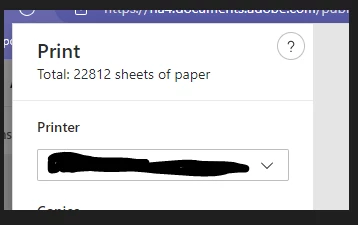
 

This was suppose to be a 1 page document but it shows upt o her as a 22,812 so she would not sign it.


2nd case, when employee was print a document it gives a mis-matching page information.
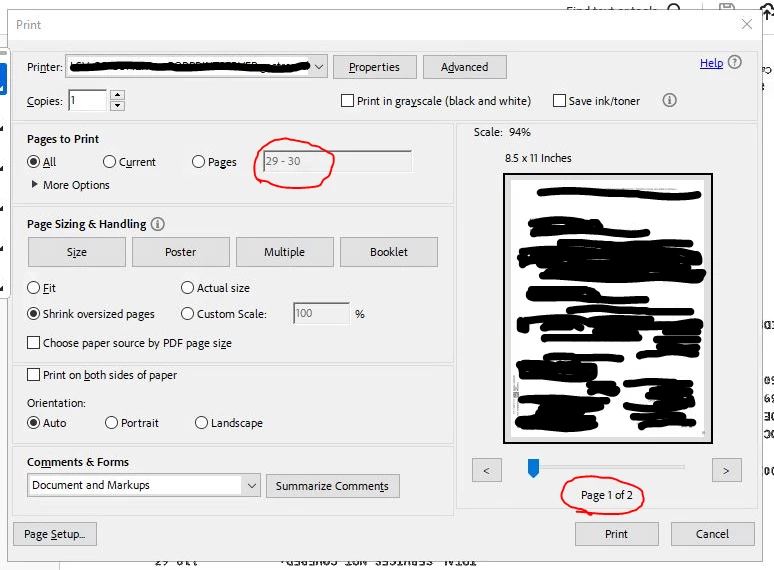
We just want to make sure that there's no hidden pages.

This topic has been closed for replies.

2 replies

Brad @ Roaring Mouse
Community Expert
Community Expert
September 7, 2024

In your second case, what is happening is that your PDF was probably extracted from a larger document but will still appear as page numbers 29 and 30. The figure at the bottom refers to the number of pages in the document print job, which is 2 in your case, so what you're seeing is normal.

S_S
Community Manager
Community Manager
September 6, 2024

Hi @PaChow,


Hope you are doing well. Thanks for writing in!


This looks quite strange. I did look up about the issue when printing with Edge, and this looks like a bug has been filed with Chromium for it.


For Acrobat, does it appear randomly or with specific files? This looks to me like an issue with the page numbering where the page has been extracted from a document.

Is it so? In that case, you might want to check the fit option in size should help you analyze if the page actually contains any further info or if it is a blank page on the second. 

You might want to try changing the printer to Adobe PDF Printer and see if you see the same problem there too.


If neither of the situations match the case, would you mind sharing the sample file over a private message would be great to investigate and test the issue in house.

[To send a private message, click on my profile name, followed by the blue "Send Message" button on the next page]


-Souvik