
Participant
July 5, 2017
Answered

Printing a selection from a page

  • July 5, 2017
  • 3 replies
  • 7724 views

Hi.

I am trying to print just a specific selected area from a PDF doc but seem to be unable to find the 'print selected graphic' option that the help pages keep referring to. I am using Adobe Acrobat Pro DC on a PC. When I select an area of the page I want to print, I can right click and choose 'Take a snapshot' but then when I select Print there are no further options for me other than to print the whole page. Help! Thank you.
Correct answer Dave__M

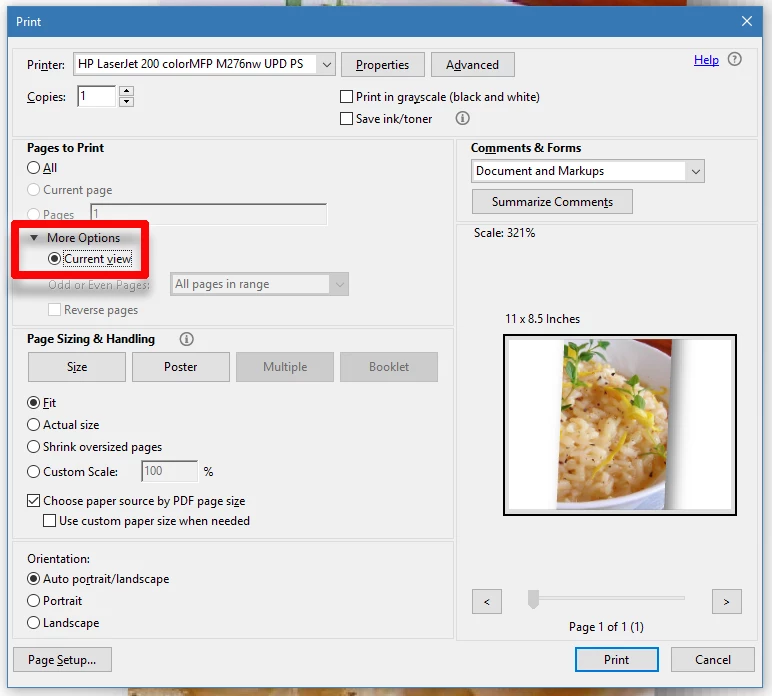
You could zoom in to view the desired portion of a page/image, then go to the print dialog box, click More Options under Pages to Print, and use the Current View.  This option will print just what is visible in the view area of Acrobat.

I hope this is helpful.

My best,

Dave

3 replies

Participant
January 31, 2024

Did you ever find an answer to your question? I have the same issue here. I've been using acrobat for a while but it changed and now it doesn't work.   Thanks

Dave__M
Community Expert
Dave__MCommunity ExpertCorrect answer
Community Expert
July 6, 2017

You could zoom in to view the desired portion of a page/image, then go to the print dialog box, click More Options under Pages to Print, and use the Current View.  This option will print just what is visible in the view area of Acrobat.

I hope this is helpful.

My best,

Dave

Dave__M
Community Expert
Community Expert
July 6, 2017

Additionally (and I think this will directly answer the original question)...

If you use your Snapsot tool and draw a box around your image, you can then right-click on the image and choose Print.

The Print dialog box will then show the Selected graphic option you mentioned.

My best,

Dave

Bernd Alheit
Community Expert
Community Expert
July 5, 2017

Open MS Paint, paste the snapshot, and print it.