



Kenneth Kawamoto
Community Expert
Community Expert
September 6, 2026
Question

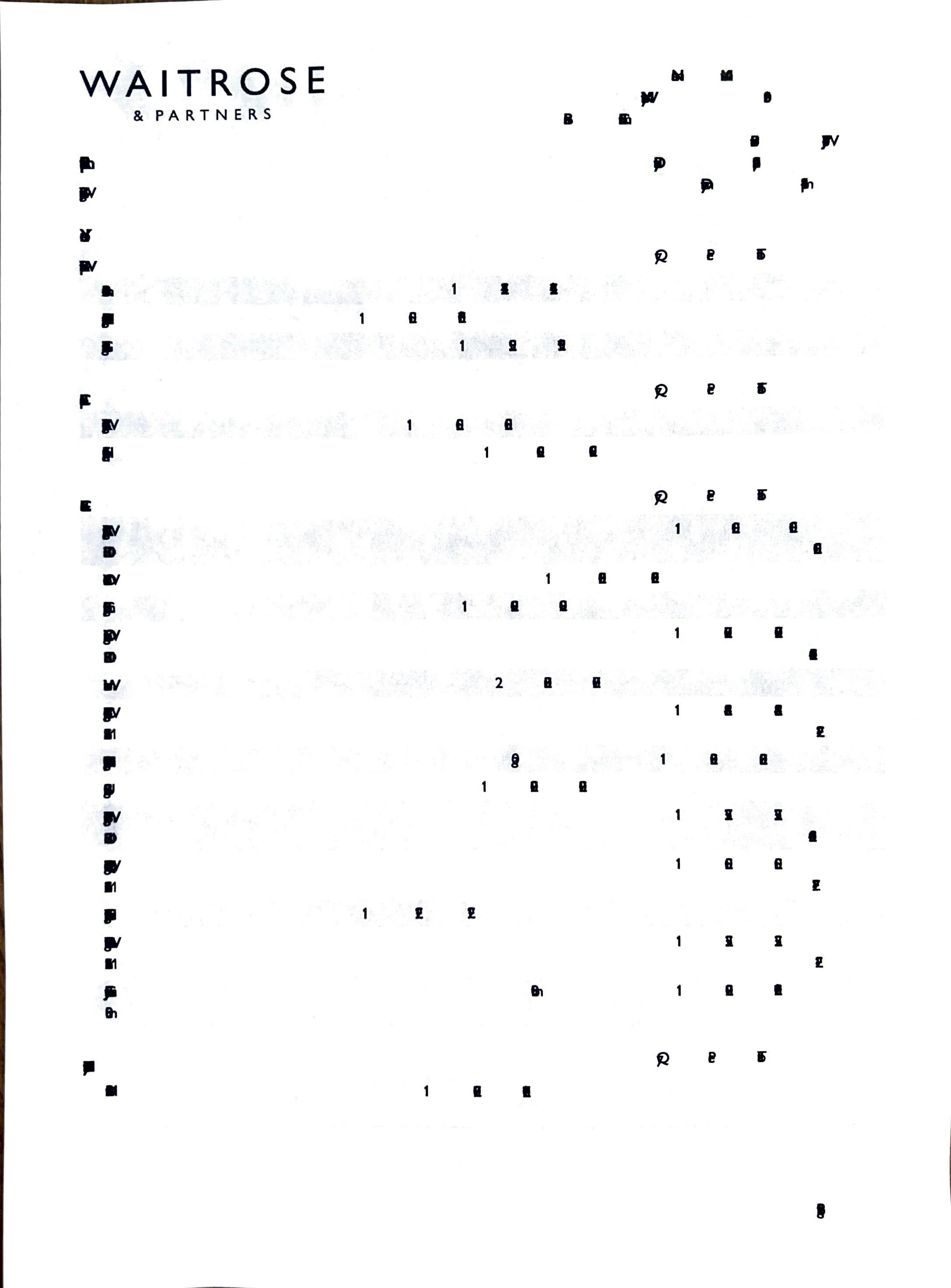
Printing error from Acrobat

My Acrobat 26.1.21563.0 on macOS 12.7.6 doesn't print the text correctly from certain PDFs.

Preview prints the exact same PDFs without any issues.

Any ideas why this might be happening and how I could fix it? TIA!


    9 replies

    Kenneth Kawamoto
    Community Expert
    Community Expert
    September 9, 2026

    I have tested this PDF on the latest setup: Acrobat 26.2.21869.0 on macOS 26.6.2 (25G83) and it printed fine. So I think it’s a combination of slightly old Acrobat and OS/print driver mishandling Type 0 font. Thanks guys for your input! 

    Translate
    Participating Frequently
    September 7, 2026

    Since the same PDFs print correctly from Preview, you should first try Print as Image in Acrobat. Go to File > Print > Advanced, then enable Print as Image and try printing again. This can help when Acrobat has trouble processing fonts or other content in a particular PDF.

    You should also check Help > Check for Updates, especially since you’re on macOS 12.7.6. If it only happens with certain PDFs, the PDF itself may have something Acrobat is having trouble rendering.

    Translate
    Kenneth Kawamoto
    Community Expert
    Community Expert
    September 7, 2026

    Thanks Randy. This is a bit academic since I can print using Preview, or print as an image from Acrobat, but it would be good to get to the bottom of this. I've had a similar issue with a different PDF in the past too.

    I can't tell how the PDF was generated (definitely machine-generated), but the fonts may be where the problem lies, as Acrobat prints the logo image fine.

    GillSansNova-Medium-Identity-H
    GillSansNova-SemiBold-Identity-H

    Both are Type 0 / CID fonts using Identity-H encoding.

    Translate
    Randy Hagan
    Community Expert
    Community Expert
    September 7, 2026

    I realize I’m making an assumption that I shouldn’t be making.

    Type 0 CID fonts have room for extended character sets. One reason is to provide for ligatures and extended punctuation characters. The other is to provide for large character sets for East Asian languages.

    Please excuse my Western assumptions, but which language are these documents created in?


    Randy

    Translate
    Randy Hagan
    Community Expert
    Community Expert
    September 6, 2026

    What printer? What driver? Are there any common denominators in how your problematic PDFs are created? Do you create the PDF files that are not printing? And what application(s) being used to generate the PDFs? Do they print from the originating applications?


    If you can give us more information on your issue, it’ll help us greatly in finding a way to get you past your issues.


    Randy

    Translate
    Kenneth Kawamoto
    Community Expert
    Community Expert
    September 6, 2026

    The printer is a Brother HL-L5200DW, using the macOS-bundled “Brother HL-L5200DW series-AirPrint” driver.

    At the moment, I’m only seeing the issue with PDFs from one particular source (a supermarket). The same PDFs print perfectly fine from Preview, so this seems to be an Acrobat-specific issue rather than a printer or driver problem.

    Translate
    Randy Hagan
    Community Expert
    Community Expert
    September 6, 2026

    That’s a good printer for heavy print cycles. 

    I’d suggest that if you’re getting problems from one client’s files, and not others,  that it’s a fair indication that you’ve got other problems than Adobe Acrobat. It sounds like you’ve got a workaround, which is good news, but let’s see if we can delve into your issues a bit more.

    How is that client generating their PDFs? What kind of files are they? It looks like your example may be run off a letterhead/form. Is that the case? Is there any variable data in the files, like invoices or statements, which are being generated by them and/or you? If so, how is it being placed into the PDF job(s)? And, what kind of fonts (which fonts, in which font formats) are those files generated with?

    I’m sorry that I keep asking more questions, but that’s how we can better sleuth what’s wrong and make it right.


    Randy

    Translate