
Participant
December 4, 2017
Answered

Printing for Book Binding

  • December 4, 2017
  • 2 replies
  • 27394 views

I am trying to make a Christmas gift for my newly wedded daughter. I wanted to take a 190 page .pdf and turn it into a bound book that I bind using the Perfect Bound method however, I cannot figure out the best way to print the documents to make multiple book signatures and it's making my head spin. My .pdf is just page after page in numerical order. What are the proper choices to make when printing this type of document or how do I rearrange the pages prior to printing book signatures. I am using terminology that I hope is correct. Got it from: https://www.designersinsights.com/designer-resources/choosing-the-right-binding-type/

Thanks, any guidance would be greatly appreciated.

Lisa
This topic has been closed for replies.
Correct answer Abambo

Congratulations to your daughters wedding.

Now for your problem, I understood the following:

You have a PDF of 190 pages and you want doing the bindings yourself.

I normally send that to a service provider, who does all the hard work for me, but if I would need to do it myself, I would proceed as follows:

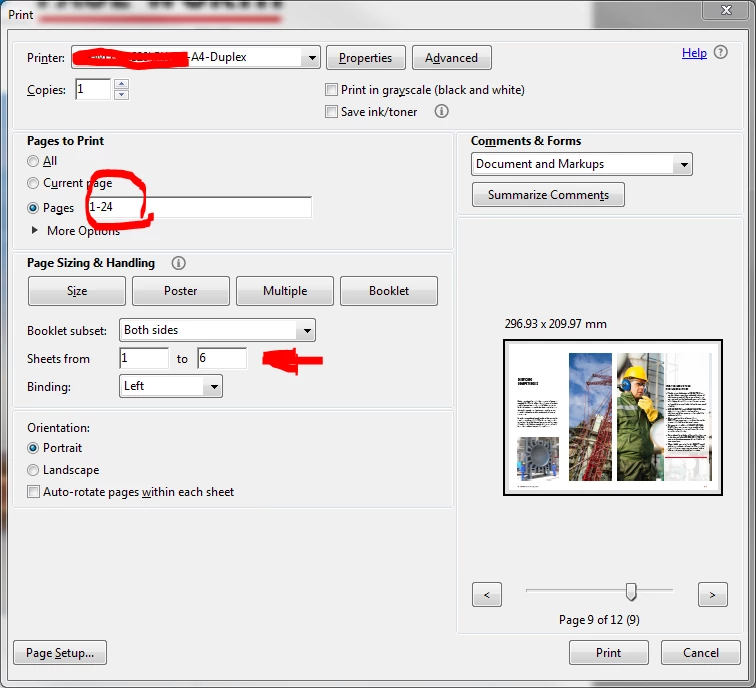
In the "Pages to print" you need to select the bindings, using a multiple of 4. In addition, the bindings should be the same size (i.e. having the same amount of sheets. You need to decide how many sheets you can handle per signature (because that's basically the reason for using signatures).

Your 190 pages will lead you to 47.5 sheets which will be 48 sheets (2 blanc pages). 48 sheets may be separated in 8 signatures à 6 sheets. You can probably handle that quite easily. Other possibility: 3 signatures à 16 sheets, 4 à 12, 6 à 8 etc.

First signature will be 1-24 pages to print, second 25-48, ...

I hope this helps. Good luck.

2 replies

Kahrhik
Participating Frequently
January 6, 2019

Honestly don't comprehend why Adobe didn't just add a, "Use signatures(sections)", and let you define the number of freaking pages in each set. While this isn't as insane as it might have once been, if you had no option at all for booklets, and you would have had to mess around with printing individual pages, and flipping around pages, etc. But.. this feature is *literally* only good for printing things that are basically pamphlets, which you plan to staple together.

Its 2019 when I post this, 2 years "after" the original post, and.. it still works, or rather doesn't work for bigger projects? wtf?

Abambo
Community Expert
Community Expert
January 6, 2019

That’s a very special case if you are not a professionnal printer. If you are, you have interest to have better tools.

ABAMBO | Hard- and Software Engineer | Photographer
Kahrhik
Participating Frequently
January 10, 2019

Well, Abambo. Betting you haven't looked around, like at all, at how many youtube videos, pinterest posts, etc. there actually are out there at this point on the numerous ways you can bind books. This isn't just a, "Only professionals need it.", things, its something a significant number of hobby people do as well, and.. while most tend to make blank journals, this doesn't mean "all of them" are doing so, or would, if they had the option. In a sense, you are probably sort of right, but.. one has to wonder why the F every tool to do something easily, or sensibly, always has to be something that costs more than I paid for the freaking computer I use it on.

Oh, and thank Dov. Think I will do that. It gets kind of annoying when people seem to assume that, "only professionals would want this", and the results is often that *no one* can do so without some unbelievably absurd work around, or a 4+ digit, not including pennies, software program to accomplish it. There "are" some projects out that supposedly could, like one I found that, I think, literally redoes the whole PDF, chopping it up into separate files, the having you still jump through hoops to print them, but it also didn't output any results, so I have no idea.. lol This is, however, a bit like taking your car to a chop shop, and having them cut the body off, to change a broken fan belt...

Abambo
Community Expert
AbamboCommunity ExpertCorrect answer
Community Expert
December 6, 2017

Congratulations to your daughters wedding.

Now for your problem, I understood the following:

You have a PDF of 190 pages and you want doing the bindings yourself.

I normally send that to a service provider, who does all the hard work for me, but if I would need to do it myself, I would proceed as follows:

In the "Pages to print" you need to select the bindings, using a multiple of 4. In addition, the bindings should be the same size (i.e. having the same amount of sheets. You need to decide how many sheets you can handle per signature (because that's basically the reason for using signatures).

Your 190 pages will lead you to 47.5 sheets which will be 48 sheets (2 blanc pages). 48 sheets may be separated in 8 signatures à 6 sheets. You can probably handle that quite easily. Other possibility: 3 signatures à 16 sheets, 4 à 12, 6 à 8 etc.

First signature will be 1-24 pages to print, second 25-48, ...

I hope this helps. Good luck.

ABAMBO | Hard- and Software Engineer | Photographer
Participant
December 6, 2017

Thank you Abambo! I will give this a shot later today! And thank you for acknowledging my daughters wedding. It was beautiful!

Participant
December 6, 2017

Mission accomplished and now I understand how all this work! Will take this info forward in life with me. Thank you for giving me a guru moment!