Inspiring
May 11, 2025
Question

printing issue

  • May 11, 2025
  • 1 reply
  • 352 views

Why is my exported PDF taking forever to print??
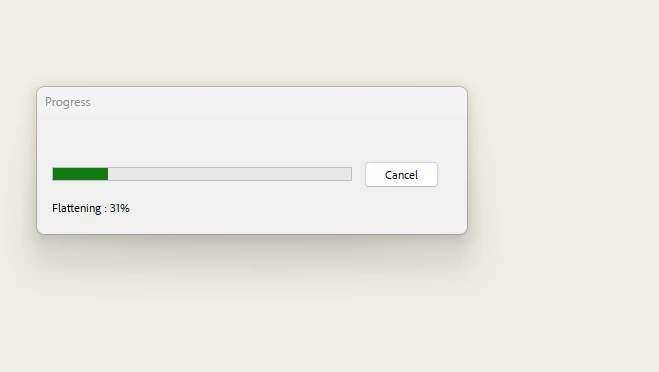
 

each page has to flatten separately?!?

1 reply

Legend
May 12, 2025

Hi @hendy_5450


Sorry for the troubled experience. And thank you for reaching out. 

Could you let us know if you are still experiencing this issue? Are you trying to print to a Physical printer or a PDF Printer? If this is PDF Printer, is the file location on the local machine? 

It is hard to suggest anything with the limited information about workflow, machine and environment. 


~Tariq

Inspiring
May 12, 2025
a physical printer
AnandSri
Legend
May 13, 2025

Hello!


I hope you are doing well, and thanks for sharing the details.


Is it happening with all the PDFs, or with a specific PDF? Are you on a Mac or Windows machine, and what is the version? Based on your description and the screenshot showing the “Flattening: 31%” progress dialogue, it looks like Adobe Acrobat is flattening complex content before printing.

Flattening is a process Acrobat performs when A PDF contains transparency effects, layers, or non-standard fonts, you're printing to a non-PostScript printer or using certain print drivers. You're printing from Acrobat/Reader using settings that require conversion to an older PDF format or image

This process may slow down printing, cause delays, or even make the print job fail, especially with large or graphic-heavy documents.


Please ensure you have the latest version of Acrobat installed on the machine: 25.001.20474 (Win) | 25.001.20476 (Mac), Apr 28, 2025. Check for any pending updates from the Menu > help > check for updates, install the updates, restart the app and the machine, and try again.


Print as Image: In Acrobat, go to File > Print. Click Advanced. Check the box that says “Print as Image”. Click OK and try printing again. See this article for more details: https://adobe.ly/3FbKGhi


Flatten the PDF Manually (Before Printing): If the document has a lot of transparency or annotations, open the PDF in Acrobat Pro. Go to Print Production > Flattener Preview. Choose the settings you need and click Apply. Save the PDF and then try printing again. See this article for more details: https://adobe.ly/4mfcm5H


Convert to PDF/X Format: Use File > Save As Other > Press-Ready PDF (PDF/X). This flattens the file to be more print-friendly.

Ensure that you have the latest printer driver and firmware installed, along with all the mandatory and optional updates of the operating system. 


Let us know how it goes.

Thanks,

Anand Sri.