
Participant
November 4, 2024
Question

Printing MS Word to PDF Fail because of Font

  • November 4, 2024
  • 2 replies
  • 1059 views

Hello,

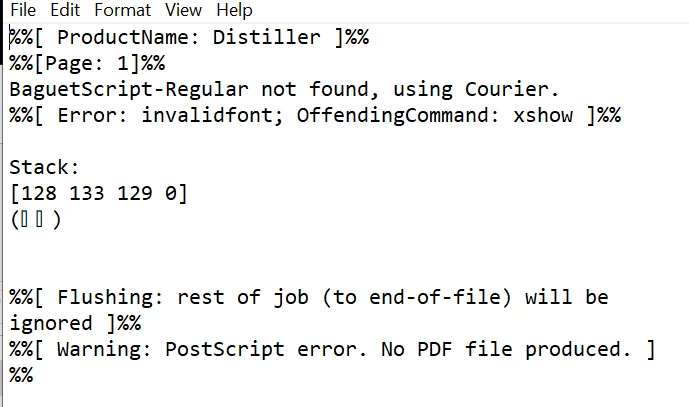
Can Adobe update your list of fonts? Somehow when I try to print to pdf from MS Word using Adobe Print, I get this postscript error .txt message.

The only fonts used in the particular word doc are: Arial, Verdana and Georgia (although the doc default was Aptos).


2 replies

Abambo
Community Expert
Community Expert
November 25, 2024

Besides what @S. S asked you to do, you should always give the OS and version number and the programs involved and version numbers. This problem is not a problem of "updating the fonts list": Adobe works with any supported TT or OT font, that is correctly definfined. It does not have a fixed font list somewhere embedded in some config files.


If you look at the message, your Word file seems to handle more fonts than you think, as it want's to use a BaguetScript-Regular font. Such fonts may be hidden in some embedded graphics, or as spaces or similar.


What I do, when I have a similar issue: 

  • I create a copy of my file. I delete all pages, except the offending page and try to create my PDF.
  • If that fails, delete half of the content and check if that works. etc. 
  • If you found the culprit you need to decide how to progress. 

This works, if the error is not systematic with all files you try to convert. 

ABAMBO | Hard- and Software Engineer | Photographer
S_S
Community Manager
Community Manager
November 27, 2024

Thanks, @Abambo, for the detailed insights.


We were able to reproduce in-house and this is what we found out:

Root Cause:

  • The issue occurs because the font is not included in the PostScript (PS) file.
  • When the distiller tries to convert the PS file to PDF, it looks for the font in the system folder.
  • However, cloud fonts, which are specific to Microsoft 365, are not available for other applications, leading to the problem.


This will be fixed with the new PDF Printer.


-Souvik

S_S
Community Manager
Community Manager
November 25, 2024

Hi @Nat34974405jp0k,


Hope you are doing well. Sorry for the trouble. 


Do you see this issue with every file you try to use? 

Would you mind sharing print logs with us to help us understand if this is related to Acrobat?

Steps can be found here: How to collect Print logs for Acrobat/Reader?


Also, for converting the files from Word using Acrobat PDF Printer, would you mind checking if this has been done: 

Go to Print-> Adobe PDF-> Printer properties-> uncheck "Rely on system fonts only, do not use document fonts"-> OK.


Look forward to hearing from you.


-Souvik