



SuzzyFlamingo
Inspiring
March 6, 2025
Answered

Printing question

  • March 6, 2025
  • 2 replies
  • 266 views

Hi, Dear Friends!

Last time, I was privileged to be helped here. Maybe I can ask for more help.

I want to print my PDF on A4 landscape, with two instances (the file itself is a portrait) across one side and two instances across the other side. So 4 instances in total on one sheet of paper.

 I tried this:
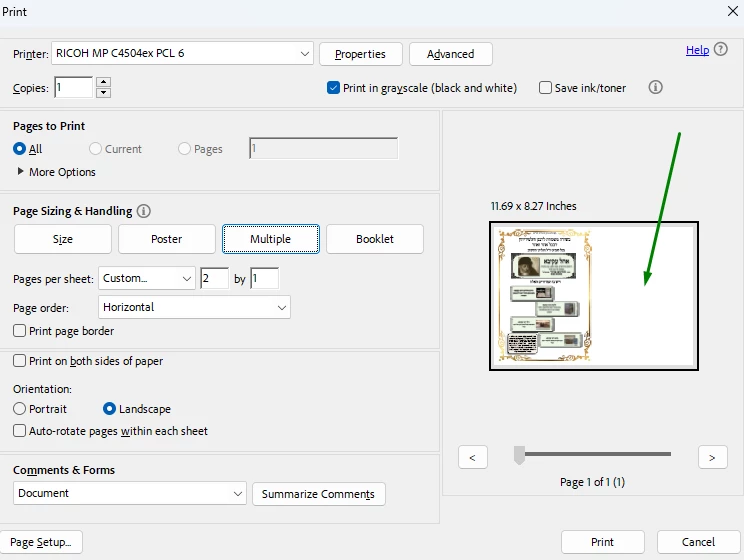
I tried this


As you can see, it only shows me one instance on one side. I need two instances on both sides.

Possible?

Thank you, and have a good day!
Susan Flamingo

Correct answer try67

Under "Pages to Print" select the "Pages..." option and enter "1,1".

2 replies

try67
Community Expert
try67Community ExpertCorrect answer
Community Expert
March 6, 2025

Under "Pages to Print" select the "Pages..." option and enter "1,1".

Meenakshi_Negi
Legend
March 6, 2025

Hi SuzzyFlamingo,


Thank you for reaching out.


If you are trying to get the two instances of a single-page PDF on a sheet, please try the steps suggested in the correct marked response on the following community thread: https://adobe.ly/3DlqHfq. Check if that helps.

More information would be helpful if you are referring to a different scenario.


Let us know how it goes.


Thanks,

Meenakshi