
January 16, 2018
Answered

Printing to smaller page size is ruining my pdf quality

  • January 16, 2018
  • 1 reply
  • 1430 views

I have a pdf drawing that is a page size of 44in x 35in. I want to reduce the page size to 8.5x11 without losing quality. In Adobe Acrobat Pro X, I was able to print to a new pdf file, with the correct dimensions of 8.5x11, without issue. In Adobe Acrobat Pro XI, it's killing my quality when I try to print to a smaller page size. Is there an output setting I need to change?
This topic has been closed for replies.
Correct answer Karl Heinz Kremer

Printing a PDF to PDF just to change the target page size is a bad idea (actually, in most cases, printing a PDF to PDF - or refrying the PDF - is a bad idea unless you know exactly what happens to the different kind of structures in your PDF file).

If this is something you need to do a lot, it may be worth investing in Acrobat DC Pro. With the most recent version, you can resize your PDF pages without any change in quality. See here for more information: Scaling Page Content in Adobe Acrobat Pro DC - KHKonsulting LLC

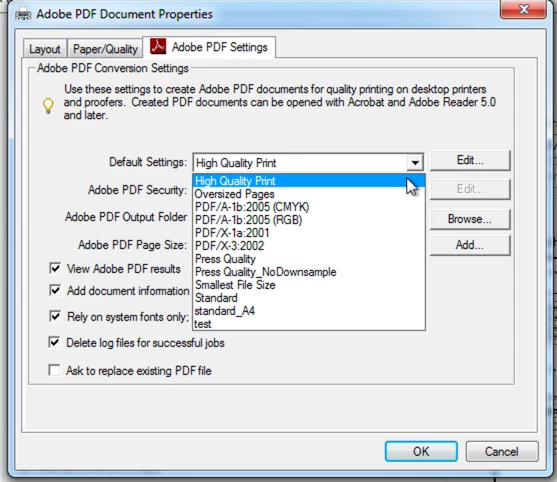
If you are stuck with Acrobat XI and the print to PDF method, then see what job options are associated with your PDF printer. After you select the "Adobe PDF" printer in Acrobat, click on the "Properties" button next to the printer selection and change the "Default Setting" to e.g. "High Quality Print":

1 reply

Karl Heinz  Kremer
Community Expert
Karl Heinz KremerCommunity ExpertCorrect answer
Community Expert
January 16, 2018

Printing a PDF to PDF just to change the target page size is a bad idea (actually, in most cases, printing a PDF to PDF - or refrying the PDF - is a bad idea unless you know exactly what happens to the different kind of structures in your PDF file).

If this is something you need to do a lot, it may be worth investing in Acrobat DC Pro. With the most recent version, you can resize your PDF pages without any change in quality. See here for more information: Scaling Page Content in Adobe Acrobat Pro DC - KHKonsulting LLC

If you are stuck with Acrobat XI and the print to PDF method, then see what job options are associated with your PDF printer. After you select the "Adobe PDF" printer in Acrobat, click on the "Properties" button next to the printer selection and change the "Default Setting" to e.g. "High Quality Print":