


Participant
April 16, 2025
Answered

Problem: Calculating a final score on a form using Radio Buttons as values

  • April 16, 2025
  • 2 replies
  • 752 views

I'm working on a form that has 9 questions. Each question has 4 answers - either A, B, C or D - and the user will pick the answer that is most relevant to their situation.


Each question is a group of four radio buttons and are marked as Q1, Q2 etc., up to Q9. The radio buttons within these groups are marked as "4", "3", "2" and "1" as these are the values I wish for them to return. The idea being that A = 4, B = 3, C = 2, D = 1.



There are three questions per page (3 pages for 9 questions) and on the final page I wish to display the total score. (As an example, if the user picks A for all 9 questions, they should receive a score of 36.)


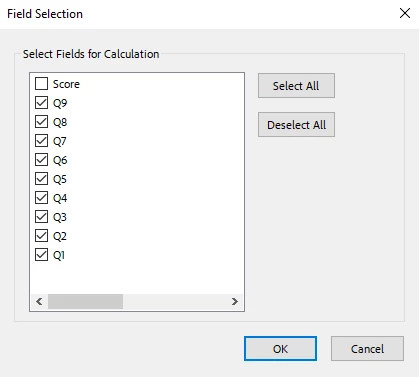
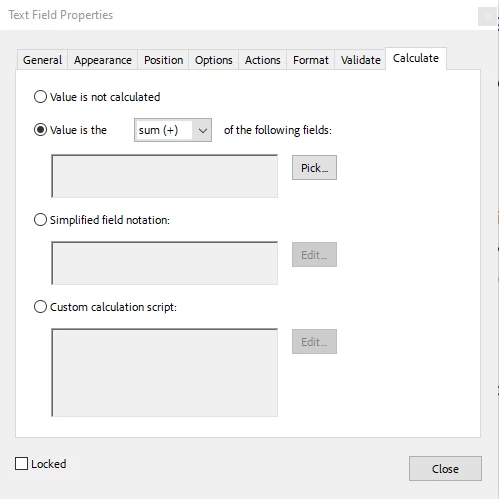
I am using a text field on the final page to display the score. Under the 'Format' tab I have the Format Category set to 'Number' and the Decimal Places set to '0'. Under the 'Calculate' tab, I have "Value is the sum (+) of the following fields:" selected. When I go to Pick, I select all 9 questions (Q1 -> Q9). However, after selecting OK, the questions do not appear in the box:


Am I doing anything wrong here? I have saved and reloaded Acrobat several times and have confirmed that the form does not require any signatures. The form was built in InDesign and then exported as an interactive PDF. My InDesign version is 17.0 x64 and my Acrobat version is 2024.004.20272.


Thanks in advance.

Correct answer Nesa Nurani

Don't use field list to select a field and go to properties, instead directly click on the field and go to properties.

2 replies

try67
Community Expert
Community Expert
April 16, 2025

Try deleting the field, then create it again and apply the calculation again. If it still doesn't work, please share the file for further help.

PDF Automation Station
Community Expert
Community Expert
April 16, 2025

It should work, but... Is your second screenshot after you have made the selections in your first screen shot?  Because the fields are not sticking or you would be able to see them in the second screenshot.

aaronjcAuthor
Participant
April 16, 2025

Yes, the second screenshot (Text Field Properties window) is what happens after I click OK on the Field Selection window (first screenshot). As you say, the fields aren't sticking for some reason.


I've tried a Simplified Field Notation (Q1+Q2+Q3+Q4+Q5+Q6+Q7+Q8+Q9) which also doesn't stick after hitting OK. Definitely seems like it could be a bug as this is running on a company PC in which certain policy settings might be affecting Acrobat (though we usually don't have many problems with Adobe software). 

PDF Automation Station
Community Expert
Community Expert
April 16, 2025

There are a lot of complaints about this issue on this forum.  I believe it is a setting but I don't know what the setting is.  However, I have found that reverting to recommended settings works.  Here's how (Windows OS):

  1.  Type Acrobat in the Windows search field.
  2.   Right-click the Acrobat app and select > Open file location.
  3.   Right-click the Acrobat file and select > Troubleshoot compatability.
  4.   Select "Try recommended settings".