


Participant
November 6, 2024
Question

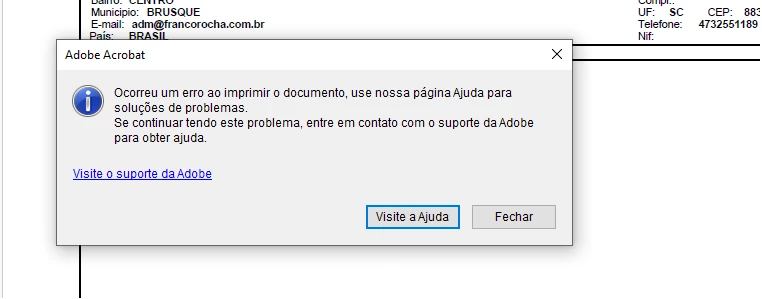
Problemas ao imprimir PDF

  • November 6, 2024
  • 2 replies
  • 447 views

Bom dia.

Estou tendo problemas em 3 computadores ao imprimir um arquivo.pdf, ao imprimir exibe uma mensagem dizendo que ocorreu um erro ao imprimir o documento, use nossa pagina ajuda para soluções de problemas. se continuar tendo este problema, entre em contato com o suporte da adobe para obter ajuda.

OBS: Já reinstalei o Adobe Acrobat, fiz atualização, tentei imprimir como imagem dentro do Acrobat, Já tentei fazer esses procediemntos que estão nesse linkhttps://helpx.adobe.com/br/acrobat/kb/troubleshoot-pdf-printing-acrobat-reader.htmlmas sem sucesso.

A impressora está imprimindo normalmente nos outros programas, somente no Acrobat está acontecendo esses problemas.

Aguardo uma resposta, o mais rapido possivel!!


2 replies

Eugenia+Coeli+Novaes
Participant
June 9, 2026

Acontece o mesmo comigo. Aparece justamente esta mensagem.


Meenakshi0101
Community Manager
Community Manager
June 9, 2026

Hi Eugenia Coeli Novaes,


Thank you for reaching out, and sorry for the trouble caused.


Please try the troubleshooting steps suggested below:


  1. Update Acrobat/Reader to the latest release
  • Open Acrobat
  • Go to Menu > Help > Check for Updates
  • Install all available updates and reboot the computer afterwards
  1. Reset Acrobat Preferences. Sometimes corrupted preference files can cause printing failures.
  • Close Acrobat completely
  • Navigate to:
    C:\Users\<username>\AppData\Roaming\Adobe\Acrobat
  • Rename the folder (for example, to Acrobat_old).
  • Launch Acrobat again
  1. Disable Protected Mode temporarily (for testing)

  • In Acrobat, go to Menu > Preferences > Security (Enhanced)
  • Uncheck the box for “Enable Protected Mode at startup”
  • Restart Acrobat and test printing again
  1. Updating the printer driver from the manufacturer's website.
  1. Print the PDF after saving locally on the machine. Avoid printing directly from network drives or cloud locations. 

If you still experience the issue, please share more information on what happens. Check if you get an error for all PDFs you try to print or specific ones.


Let us know how it goes.


Thanks,

Meenakshi

Souvik Sadhu
Legend
February 20, 2025

Hi @Vagner_Kraus2701,


Hope you are doing well. Sorry for the trouble, and the delayed response.


We made many stability and performance enhancements in the subsequent releases.

Would you mind updating the app to the latest version (2024.005.20414) and let us know if the issue is fixed for you?


To do so, go to Menu-> Help-> Check for Updates.


-Souvik
