


Participant
March 19, 2025
Question

Problems with exporting variable font in word

  • March 19, 2025
  • 2 replies
  • 992 views

Hi, I installed a variable font from Adobe Fonts (Narkiss text variable) on my computer and used it on Word on 4 of its instant-preset weights: regular, bold, 18pt and 18pt bold.

In Word everything looks fine

but when exporting as PDF—and I tried more than one way (save as PDF, save as Adobe PDF, print to Adobe PDF)—it looks like this: the bold disappears.
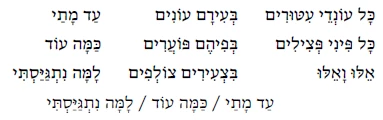
Why did it happen and how can I fix it?

Thanks!

2 replies

try67
Community Expert
Community Expert
March 20, 2025

Use the Create PDF command from the Acrobat ribbon to convert the Word file to a PDF:


harhallelAuthor
Participant
March 21, 2025

Been there, done that, didn't work

AnandSri
Legend
March 21, 2025

Hello!


I hope you are doing well. What's the current version of Acrobat installed? Please ensure you have the latest version of Acrobat installed on the machine: 25.001.2043x Optional update, Mar 19, 2025. Check for any pending updates from the Menu > help > check for updates, install the updates, restart the app and the machine, and check. For more information, see this: https://adobe.ly/4bV5fuA. Then try the following steps: 


Install Static Font Variants:

  • Embed Fonts in PDF:

    • In Word, go to File > Options > Save.
    • Check the box for Embed fonts in the file and ensure Embed only the characters used in the document are unchecked

If the issue persists, please share the PDF file, and the word file with us for further investigation.


Thanks,

Anand Sri.

harhallelAuthor
Participant
March 19, 2025