
Participant
July 19, 2021
Answered

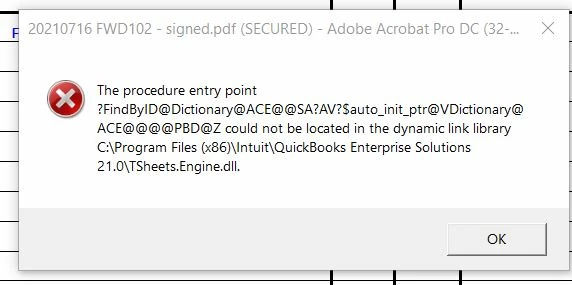
Procedure Entry Point Could Not Be Located

  • July 19, 2021
  • 2 replies
  • 19140 views

I have received this error message all day long when trying to operate Adobe Acrobat Pro DC ona Windows 10 desktop. I tried to use a keyboard shortcut to magnify the page adn received this message. I tried printing a select number of pages in a multi page document and received this message. When I was adding text using the "Comment" function typing in the document I received a delayed reaction to my key strokes and have had no issue typing in any other program all day long. I restarted my computer and successfully ran a repair on the Acrobat file and I am still having this issue. 
 

This topic has been closed for replies.
Correct answer nicknettech

FYI. The fix for me was opening cmd via Windows Key + R, typing cmd and hilding shift and enter (to open command line with admin rights) I then ran sfc /scannow. It found corrupted files. Restarted computer and testing confirmed it was fixed. 

2 replies

nicknettechCorrect answer
Inspiring
October 11, 2021

FYI. The fix for me was opening cmd via Windows Key + R, typing cmd and hilding shift and enter (to open command line with admin rights) I then ran sfc /scannow. It found corrupted files. Restarted computer and testing confirmed it was fixed. 

Inspiring
October 11, 2021

holding shift and enter*

Amal.
Community Manager
Community Manager
July 20, 2021

Hi Lizh,


Hope you are doing well and sorry for the trouble. As described you are getting the Tsheets.engine.dll error


Would you mind sharing the version of the Adobe Acrobat Dc you are using. To check the version go to Help > About Acrobat and make sure you have the version 21.05.20058 installed. Go to Help > Check for updates and reboot the computer once.


Please try to close the quickbook and reopen it and see if that helps. Also you may try to rename the TSheets.Engine.dll to ".old" as described in the correct answer marked here - https://community.adobe.com/t5/acrobat/entry-point-not-found-acrobat-pro-dc/m-p/12060097#M318859 and see if that works for you.


Regards

Amal


Participant
July 27, 2021

I am using Adobe Acrobat Pro DC but it was NOT in connection with Quickbooks and I do not use TSheets in Quickbooks. I chatted with an Adboe support team member who even though the problems went away once I contacted them still insisted on removing and reinstalling the program which erased ALL of my personal settings in the program and this week I am having issues with the program crashing while in use and I am un able to locate the program in my program list not can I pin the program to my start menu for east access. I am really not sure what the support team member did to my coputer and I am very unhappy.

Participant
January 19, 2022

Why don't you just fix the problem?  Appears there are enough of us having this issue.  I don't use TSheets.  Did a search for that particular DLL, and it does not reside on my computer.  I should not have to rebuild QB every time I use a program not associated with QB.  And there appears to be no fix for Adobe when QB is running.  PDFs not from QB should not be linked to QB in any way.  So, please, fix this issue, as it is not a QB issue but an Adobe issue.


I am having the exact same problem, have never ever used QB in relation to acrobat and I cannot type anything in adobe without it spamming that error, my acrobat is Unusable. Quickbooks is extremely outdated, please remove any auto functionality or atleast let me turn that setting off, I have no PDF viewer/editor until this is fixed.

Thank you