Inspiring
October 18, 2023
Answered

question about the export from Acrobat Pro to Word

  • October 18, 2023
  • 3 replies
  • 1523 views

Hello,

I have a PDF coming from a scan (scan made with Acrobat Pro).

If I export from Acrobat pro to Word, I see that in my exported Word document, Acrobat added some section breaks.

How to export from Acrobat Pro to Word without adding these section breaks ?
This topic has been closed for replies.
Correct answer jane-e

@pierret18811376 


Acrobat does not have a function that will allow you to do that. It is not a word processor. Your best bet is to do a Find and Replace in Word. Save first.


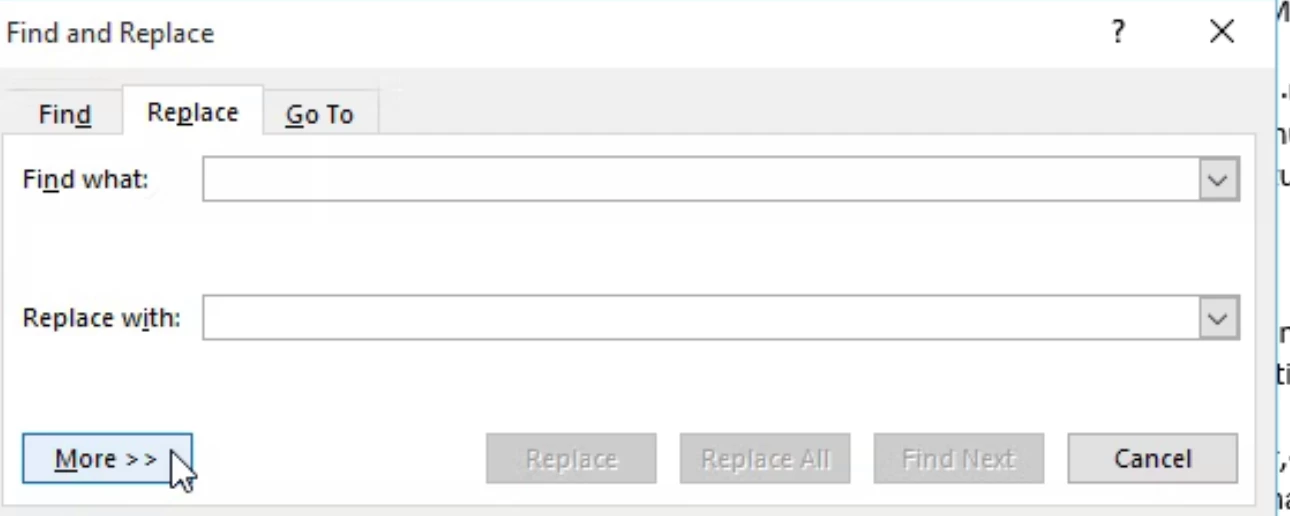
Click the More button in the bottom left:


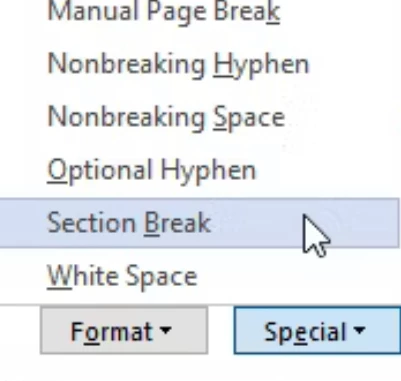
Select Section Break. I think the code it puts in for Find What  is ^b 


For Replace With, leave it blank OR choose Paragraph from the "More" menu OR anything you want.


Does this work for you?


Jane


3 replies

Inspiring
October 30, 2023

Hi @S. S 

I sent you a private message.

Inspiring
October 19, 2023

Hi Jane,

Removing the section breaks in Word is working, but I would like to know why Acrobat added all these section breaks in the exported Word file ?  By example, in the exported Word file, most of time the text is continuous, but sometimes, I have some section breaks added by Acrobat (and if I compare exported Word file VS original PDF : in the PDF, the section break is before a page change).

jane-e
Community Expert
Community Expert
October 19, 2023

@pierret18811376 


The "why" is a good question. I wondered the same thing and thought that maybe they were in the original Word file before it was converted to PDF. It's just a thought though — I haven't experimented yet.


Jane

Inspiring
October 19, 2023

You have said : "maybe they were in the original Word file before it was converted to PDF."

In fact, my PDF was coming from a scan (and not from a Word file).

jane-e
Community Expert
jane-eCommunity ExpertCorrect answer
Community Expert
October 18, 2023

@pierret18811376 


Acrobat does not have a function that will allow you to do that. It is not a word processor. Your best bet is to do a Find and Replace in Word. Save first.


Click the More button in the bottom left:


Select Section Break. I think the code it puts in for Find What  is ^b 


For Replace With, leave it blank OR choose Paragraph from the "More" menu OR anything you want.


Does this work for you?


Jane