


Participant
September 30, 2025
Answered

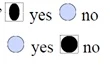
Radio Button selection is oval

  • September 30, 2025
  • 3 replies
  • 206 views

I have a radio button that when you click on it, it appears as oval instead of the standard default round.  The radio buttons for yes and no are the same size and the properties are the same. 


What is causing the Yes to appear oval instead of round?  How do I make it round like "no" is.
Correct answer richard_4949

Thank you for all your replies.  I did use Acrobat to create these radio buttons.  To fix this issue, I changed the size and made these radio buttons bigger.  I previewed it.  Then I went back and changed the height and width back to 0.15 as I wanted them. Now they are behaving properly (no black oval shapes.)  

3 replies

richard_4949AuthorCorrect answer
Participant
September 30, 2025

Thank you for all your replies.  I did use Acrobat to create these radio buttons.  To fix this issue, I changed the size and made these radio buttons bigger.  I previewed it.  Then I went back and changed the height and width back to 0.15 as I wanted them. Now they are behaving properly (no black oval shapes.)  

ls_rbls
Community Expert
Community Expert
October 1, 2025

Awesome !  I learned something new today @richard_4949  @creative explorer 

ls_rbls
Community Expert
Community Expert
September 30, 2025

Hi @richard_4949 ,


Those radio buttons in your shared screenshot does not appear to be created by Acrobat.


Is this a PDF that was created with another software other than Acrobat Pro DC (i.e. Microsoft Word)?  If that would be your case, I suspect that may explain why the PDF may not be rendering properly after importing the file to Adobe Acrobat.


My suggestion, if you do have a subscription with Adobe Acrobat Pro DC, just delete them and recreate them using the Prepare Form tool. That way you'll ensure they are all produced with the same editing tool.

creative explorer
Community Expert
Community Expert
September 30, 2025

@richard_4949 did you accidentally changed the height of the radio button? To fix it, you can either:

  • Duplicate the No radio button, and just change the properties name or
  • Create a new button or
  • Double-click on the "Yes" radio button field that looks oval. This will open the Radio Button Properties window. Go to the Position tab. and chang the height size. And click close. 
m
PDF Automation Station
Community Expert
Community Expert
September 30, 2025

I don't think that's the case.  If you change the height or width so the radio button is not a square it does not distort the shape of the  circle.  It just makes it smaller.