


Participant
October 4, 2025
Question

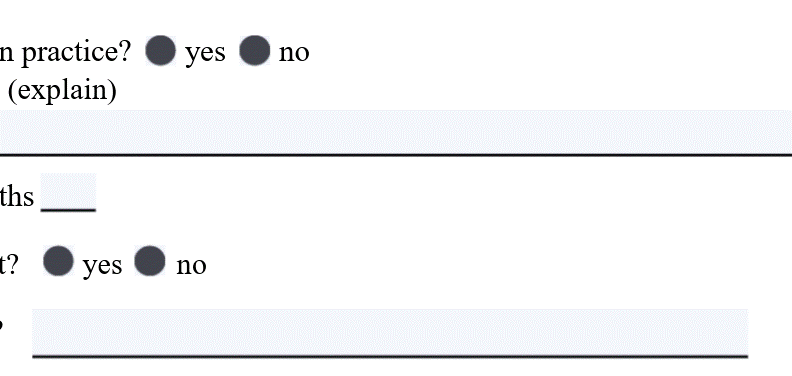
Radio Buttons blacked out in PDF

  • October 4, 2025
  • 2 replies
  • 136 views

I have a fillable form and when I preview it in Acrobat, it works just as I want it.  The radio buttons work as well.  But when I download the PDF to my laptop and view it in Chrome, all of the radio buttons are black and not functional.  I used the standard Radio Button tool in the fillable form.  Why did this happen and how do I fix it?
 

2 replies

Thom Parker
Community Expert
Community Expert
October 5, 2025

Not all PDF viewers implement all of the PDF specification. In fact, most PDF viewers are total crap. Especially the mobile and browser viewers, which can be worse than simply not implementing a feature. Some viewers modify the PDF in ways that corrupt the internal structure.  


The Adobe viewers are generally the best on every platform. 


Thom Parker - Software Developer at PDFScriptingUse the Acrobat JavaScript Reference early and often
Randy Hagan
Community Expert
Community Expert
October 4, 2025

There are a couple of ways to see PDFs and work with them in the Google Chrome browser.


One is to rely on the native PDF browser utility, which has limited capability.


The other is to by using the free Acrobat extension for Google Chrome. You can learn more about the extension and download it through this link.


Hope this helps,


Randy

richxyzAuthor
Participant
October 5, 2025

Thank you for your reply.   Then, my question is:   Does the native PDF browser utility have the ability to display and use radio buttons?  If so, how do I create that using Adobe Acrobat?  I was able to do this using Word to PDF - so it must be available in Acrobat.  How is this accomplished?

Randy Hagan
Community Expert
Community Expert
October 5, 2025

I know of no secret sauce that would make your radio buttons magically work with non-standard PDF viewers.


Wish I had better news for you,


Randy