
boun_1980
Participating Frequently
May 17, 2018
Question

Re: Acrobat Pro DC freezes when I try to "Send File"- Mac

  • May 17, 2018
  • 1 reply
  • 3997 views

Adobe is there a fix yet? It's been about a year now? The updates ARE NOT addressing this issue.

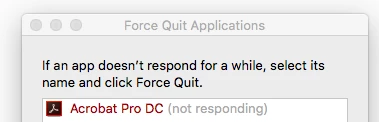
It freezes when you email, it freezes when you save it's so annoying having to Force Quit constantly.

The Adobe subscription is becoming more and more expensive - yet the care and attention to products seems to be going down hill.

Please fix - remember your original audience - graphic designers? WE RELY ON YOUR PRODUCTS SO WE NEED YOUR HELP - PLEASE!!!

This topic has been closed for replies.

1 reply

Meenakshi_Negi
Legend
May 29, 2018

Hi Benitadwyer,

Sorry for the inconvenience caused.

As you experience the freezing issue, try once the troubleshooting steps mentioned here Troubleshoot Mac OS 10.x system errors, freezes | Adobe software.

Check if that resolves the issue.

If that does not resolve the issue, try once to reset the preferences of the application.

Use the steps mentioned here How to reset Acrobat Preference settings to default.

If the issue still persists, I will suggest you to remove the application from your machine and clean reboot it.

You can use the cleaner tool Download Adobe Reader and Acrobat Cleaner Tool - Adobe Labs to remove the application from the Mac.

Once done, reboot your Mac and then re-install the application from here Download and install Acrobat DC subscription.

Let us know how it goes.

Feel free to update the thread if you still experience the issue.

Regards,

Meenakshi

boun_1980
boun_1980Author
Participating Frequently
May 29, 2018

So you want everyone on the forum to spend pretty much a whole day of their lives doing all of those steps instead of Adobe doing what we pay for and fixing the apps for us.

Has adobe forgotten that your products are actually made for professionals - we don’t have time to spend fixing issues for you.

Please fix the app and send us an update once fixed - paying $70 per month for applications that aren’t working correctly is highway robbery.

tonyharmer
Community Expert
Community Expert
May 29, 2018

Hey benitadwyer

Sorry that you're experiencing an issue, and I understand your frustration—but there are a number of things that could be causing your issue and some of them relate to your OS and network—all the staff, MVP's and ACP's on this forum are here to help you and that's what Meenakshi was trying to do. Please try to keep that in mind.

That said, let's try and find out where things are going wrong, and we'll need some more information to work with, please:

  • What version of the Mac OS are you currently running?
  • Are you on an enterprise network? This can often be a cause of issues like this, as there may be a network endpoint issue, and you can get your IT team to check against this list of endpoints.
  • Have you run any Adobe prerelease software on your machine, or older (CS) versions? If so, run the cleaner tool as directed by Meenakshi.

My suspicion here is that this is a network issue, and that's why updates won't be touching it. I'll keep an eye out for responses through the day but I am out of the studio today, so there may be a delay in my reply but let's try and get you back up and running as soon as possible.