karenr97847217
Participant
August 4, 2020
Answered

Readability of PDF

  • August 4, 2020
  • 2 replies
  • 1276 views

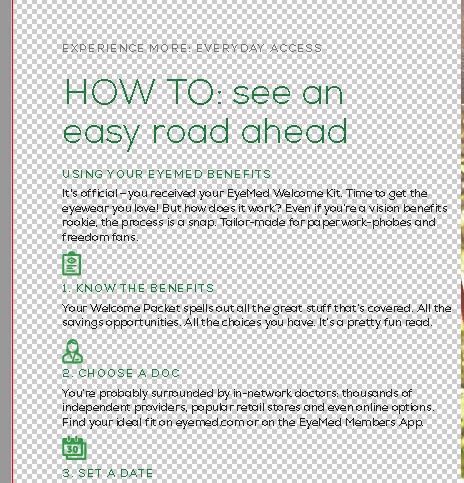
I have adobe acrobat reader, the free version. I just recently started having a problem of the pages all have what looks like full page watermarks making it impossible to read. I have to print to be able to read anything that comes to me. I have made a couple of Word docs that I converted to PDFs and am able to read them fine. Thanks for the help. 
This topic has been closed for replies.
Correct answer Test Screen Name

Ok, How is this? Thank you! Karen


Much better thanks. Please try this.

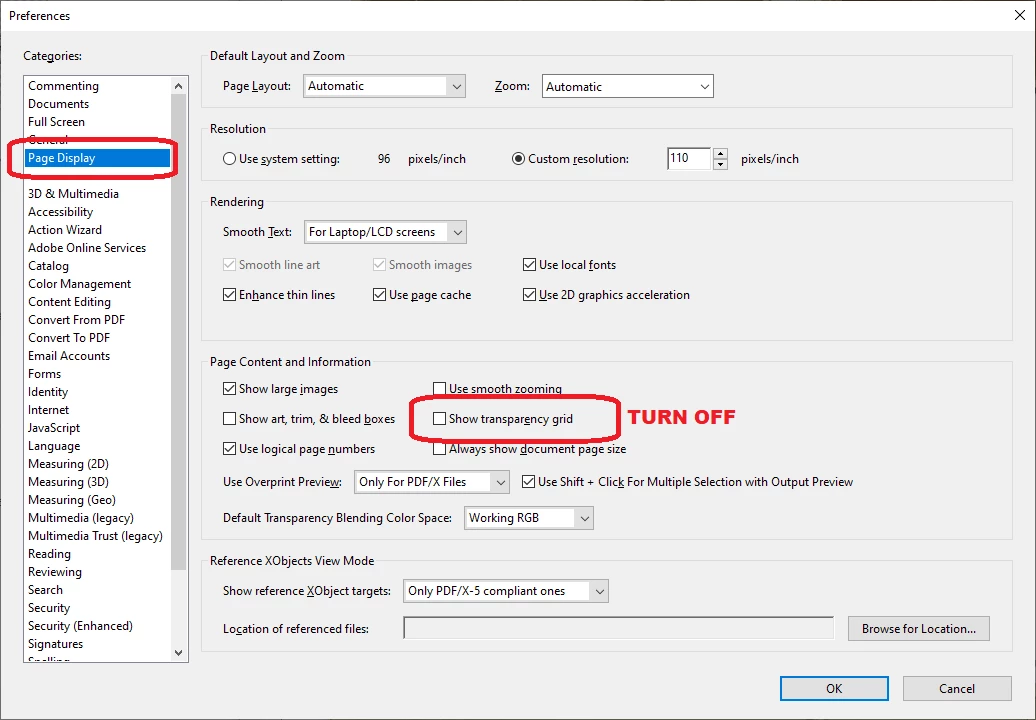
Start Reader

Edit > Preferences (in Windows)  Reader > Preferences (on Mac)

Click the Page Display tab

Look for the Show transparency grid option and turn it OFF.

2 replies

karenr97847217
Participant
August 5, 2020

Oh YAY! That worked. Amazing how one checkmark can make your life sooooooo much easier! Thanks so much!

Legend
August 4, 2020

Can you please post a screen shot showing the problem.

karenr97847217
Participant
August 4, 2020
[image: image.png]
Here is the screen shot you requested. Thanks! Karen Randall
Legend
August 4, 2020

I think you tried to send a screen shot in an email, unfortunately that doesn't work. Please return to the forum (https://community.adobe.com/t5/acrobat/readability-of-pdf/m-p/11336090?page=1#M269202 ) and Click REPLY. Over the reply box there is an icon of a picture. Please click it to add your screen shot.