
Participant
May 16, 2023
Question

Recognize scanned text, feature Hide

  • May 16, 2023
  • 1 reply
  • 1332 views

When edit the file, appear one messge " Acrobat has detected that this page doesn't have editable text. if it is a scanned page, convert it to another format using the export PDF tool."
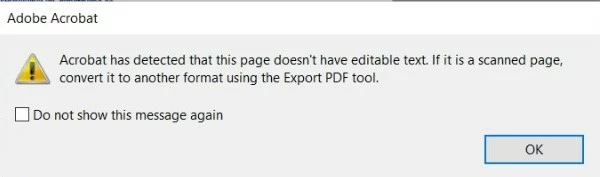
and same time " Recognize scanned text " feature hide too
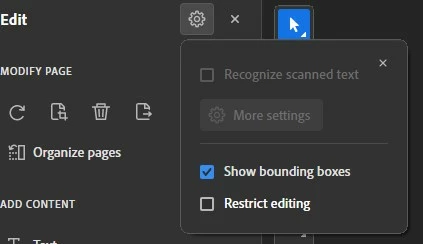


This topic has been closed for replies.

1 reply

Amal.
Legend
May 16, 2023

Hi @ShivaLogan 


Hope you are doing well and sorry to hear that. 


Is this an issue with a particular PDF file or with all the PDFs? Please try with a different PDF file and check.


What is the workflow/steps you took to create this PDF file? Please try to recreate the PDF using Adobe Acrobat Pro as described here https://helpx.adobe.com/acrobat/using/scan-documents-pdf.html  and see if that works.


You may also try to use the Scan and OCR tool on this file and try to get the text recognized by Acrobat as described here:

  1. Open the PDF with Adobe Acrobat
  2. Go to Tools > Scan and OCR
  3. Recognize Text > In this file.


Let us know how it goes.


Regards

Amal

Participant
May 17, 2023

Hi @Amal.

I try my files, my one is Adobe Acrobat Standard version

Amal.
Legend
May 17, 2023

Hi @ShivaLogan 


The OCR function is not available in the Acrobat Std version. For a detailed comparison of features, please go through the help page https://www.adobe.com/acrobat/pricing.html


Hope this information will help


Regards

Amal