Known Participant
November 8, 2023
Answered

Recommended way now to type date after signing

  • November 8, 2023
  • 1 reply
  • 1780 views

Hello

I used to be able with the Fill and Sign tool to use the "AB" tool to easily add the date.   Now when i click Fill and Sign tool in the new UI, i dont see the AB tool for typing the date anyway


what is the best recommended way now to type the date after inserting a signature.

thank you

Craig



This topic has been closed for replies.
Correct answer Meenakshi Negi

Hi craigb36097816,


Thank you for reaching out.


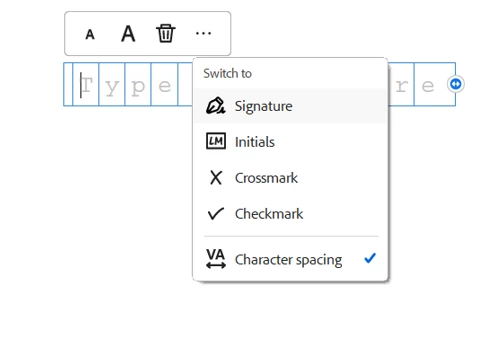
The option is still there. Please use the following steps:

- Open the PDF and select the Fill & Sign tool.

- Click on the icon "A" in the square on the left-hand tool pane.

- Click on the field where you will add the date. 

- Then click on the three dots and select "Character spacing".

Check the screenshot below for reference:


For more information, refer to the following help document: https://helpx.adobe.com/acrobat/using/fill-and-sign.html. Select "New Acrobat" after opening the link. 


Let us know if you have any questions. 


Thanks,

Meenakshi


1 reply

Meenakshi Negi
Community Manager
Meenakshi NegiCommunity ManagerCorrect answer
Community Manager
November 9, 2023

Hi craigb36097816,


Thank you for reaching out.


The option is still there. Please use the following steps:

- Open the PDF and select the Fill & Sign tool.

- Click on the icon "A" in the square on the left-hand tool pane.

- Click on the field where you will add the date. 

- Then click on the three dots and select "Character spacing".

Check the screenshot below for reference:


For more information, refer to the following help document: https://helpx.adobe.com/acrobat/using/fill-and-sign.html. Select "New Acrobat" after opening the link. 


Let us know if you have any questions. 


Thanks,

Meenakshi


Known Participant
November 9, 2023

thank you very much!

Meenakshi Negi
Community Manager
Community Manager
November 17, 2023

You are welcome!

Let us know if we can be of any further help.


-Meenakshi