Inspiring
June 28, 2021
Answered

Reduce File Size Checkbox

  • June 28, 2021
  • 1 reply
  • 1714 views

Recently while doing a Save As on a PDF to reduce the bloat the "Reduce File Size" checkbox on the first "Save As PDF" screen of randomly turned on reducing the resolution of most of the images in the PDF to 150 dpi!!!
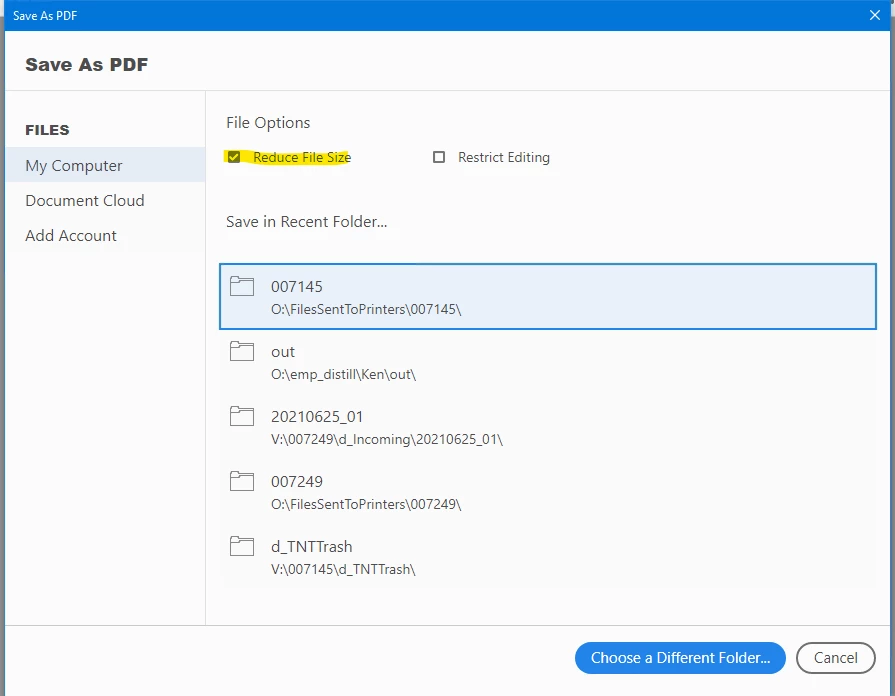
 

Opening other PDFs with images this button is OFF when doing a Save-As.


Why in the ever-loving-&#^%!!! is this check box randomly turning on?!!!


I didn't see anything in the preferecnes. Thanks for any input anyone can offer.
This topic has been closed for replies.
Correct answer KenWK

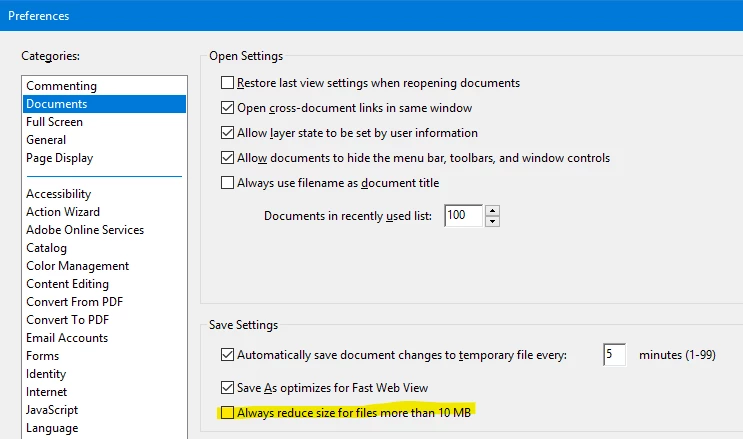
Found it. [eye roll] There is a preference, on the "Documents" tab that someplace / somehow got turned on, turning this OFF fixed the problem.

One other mystery is the Save As dialog. On two computers that button reads "Reduce File Size" but on another computer it reads "Compress PDF" even through both versions are identical.


1 reply

gary_sc
Community Expert
Community Expert
June 28, 2021

If you scan a US Letter sized document and save as a TIF, the size of a single page's storage size is about 8 MB. If you then OCR that page with a normal amount of text it's storage size will end up to be about 80-100 kb. [All of the image part of the scan is removed leaving only text.]


So, when you have a document that you wish to decrease the storage size of, you are not going to get much out of text. If you have images in the document, that's about the only place you'll get the storage space reduced. 


ALL of life is about making compromises. If you want to decrease the storage size of a document, and there are a lot of images in that document, and you wish to keep a high quality of those images, watch out how you do the Reducing File Size. 


Let me add here that you can decrease the size of an image by 400% if you decrease the actual size of that same image by 50%. But this has to be done at time of the image's creation, not by resizing in the document as that only decreases the visible size, not the actual size. 


Similarly, if you take a colored image and turn it into a Black & White image, it will be 1/3rd smaller. 


However, if you rely upon Reduce File Size, primary tool that Acrobat has available to it is to reduce the quality of images.


Hope that helps

KenWKAuthor
Inspiring
June 29, 2021

Thanks, but I understand how the compressions works. The question I have is why this button has started randomly turning on?


After a bit more research, it kind of seems like it's coming on with larger files. But again, I don't want it to.

KenWKAuthorCorrect answer
Inspiring
June 29, 2021

Found it. [eye roll] There is a preference, on the "Documents" tab that someplace / somehow got turned on, turning this OFF fixed the problem.

One other mystery is the Save As dialog. On two computers that button reads "Reduce File Size" but on another computer it reads "Compress PDF" even through both versions are identical.