





Regex and JavaScript
I have a regex problem.
In my form (attached), after selecting the country in the drop-down list, the user has to enter a code which must correspond to the pattern of his country.
The pattern is passed as a variable from the drop-down menu value.
In this example, I have a problem with Argentina, Australia and Austria: if the user enters too few digits, the entry is invalidated. As expected, this is OK.
But if the user enters too many digits, the entry is not invalidated, e.g. for Australia he has to enter 8 or 9 digits, but if he enters more it is not invalidated and this is not OK.
I've tried with several different regexes, for example for Australia I use :
\\d\{8,9\}
or
\\d\\d\\d\\d\\d\\d\\d\\d(\\d)?
but the issue is still the same.
Is this a bug or have I missed something?
Thank you for your help.
Here are the scripts I use to fill in the drop-down list (from the console):
// test 1
var c = this.getField("P2.pays1-fiscal-liste");
c.setItems([["Albanie", "\[A-Z\]\\d\\d\\d\\d\\d\\d\\d\\d\[A-Z\]"],["Andorre", "(E|F)\\d\\d\\d\\d\\d\\d\[A-Z\]"],["Argentine", "2(0|3|4|5|6|7)\\d{9,9}"],["Australie", "\\d\{8,9}"],["Autriche", "\\d{9,9}"]]);

// test 2
var c = this.getField("P2.pays1-fiscal-liste");
c.setItems([["Albanie", "\[A-Z\]\\d\\d\\d\\d\\d\\d\\d\\d\[A-Z\]"],["Andorre", "(E|F)\\d\\d\\d\\d\\d\\d\[A-Z\]"],["Argentine", "2(0|3|4|5|6|7)\\d\\d\\d\\d\\d\\d\\d\\d\\d"],["Australie", "\\d\\d\\d\\d\\d\\d\\d\\d(\\d)?"],["Autriche", "\\d\\d\\d\\d\\d\\d\\d\\d\\d"]]);
This is the Validation script used in the text field:
var string = this.getField("P2.pays1-fiscal-liste").valueAsString;
console.println("string: " + string);
var regex = new RegExp(string);
console.println("regex: " + regex);
if (event.value) {
	console.println("event.value: " + event.value);
	var valid = regex.test(event.value);
	if (!valid) app.alert("Invalid value.");
	event.rc = valid;
}
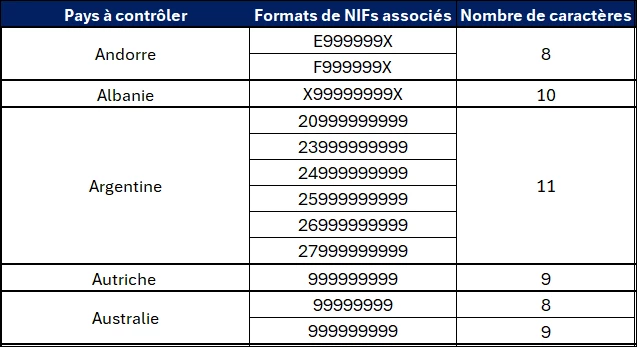
Here are the patterns to follow, where
X = any letter
9 = any digit

 AdChoices