
Participating Frequently
February 12, 2025
Question

RELATIVE LINKS

  • February 12, 2025
  • 1 reply
  • 788 views

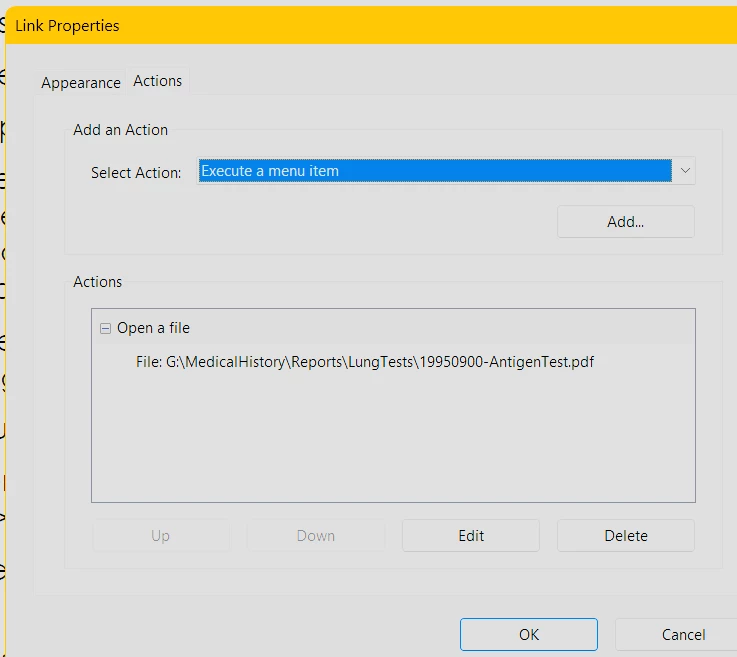
Created a PDF from a Word file that had HYPERLINKS in it.  Acrobat interpreted the links as OPEN A WEB (Execute a Menu Item) links.  I am EDITING those links to make them OPEN A FILE links, but when I ADD the file in the EDIT dialog box, the links become ABSOLUTE links with the drive letter included.  What do I need to do to create RELATIVE file path to the linked file?
1 reply

try67
Community Expert
Community Expert
February 13, 2025

If the links are to documents that are on the same drive as the PDF, they will be relative, even though it doesn't appear that way in Acrobat. You can easily test it by moving the PDF to another folder. You'll see that the links will now point to a different location. If the files you linked to are on another drive, though, the links will be absolute with the full path of the file.

DaleMWebbAuthor
Participating Frequently
February 14, 2025

Links SEEM to be RELATIVE when SD card is transferred to a second computer, but each link throws up a SECURITY WARNING when clicked using Acrobat READER.  I'm sure the person I'm giving the SD card to will only have READER.  (Acobat is WAY too expensive for the vast majority of non-commercial users.)  Anything I can do to prevent the recipient from having to "ALLOW" file opens on READER?  Acrobat and Reader evidently do not treat files/links the same.

try67
Community Expert
Community Expert
February 14, 2025

Are the links to other PDF files?

Try going to Menu - Preferences - Security (Enhanced) and disabling everything that's enabled there.