Participant
March 9, 2019
Question

Remove Context Menu item

  • March 9, 2019
  • 3 replies
  • 32811 views

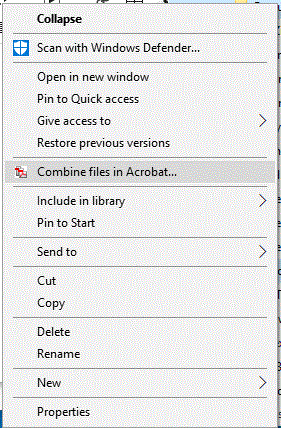
How do I remove the Context Menu item for Combine files in Acrobat... when I right click on a folder in File Explorer?

Using Windows 10 vrsion 1809 and Adobe Acrobat XI Pro version 11.0.23

3 replies

tszkinGSM
Participant
February 25, 2020

Don't know if this reply is a little late, but you can unregister it in regedit.exe.

Start Button>type Regedit, make sure you export a back-up and make sure the Export Range is "All" (good habit to have), browse to <Computer\HKEY_CLASSES_ROOT\Folder\shellex\ContextMenuHandlers\Adobe.Acrobat.ContextMenu>, or just Ctrl-F to find Acrobat. Once inside, double click the (Default) key and add "--" at the beginning of Value Data.


Don't have to save or anything, the change is immediate. Check by right-clicking your folder and it should be gone.

This is a non-destructive way of removing it. Re-enable it by removing the "--" and you'll get it back.


Hope that helps!

Participant
May 30, 2020

Thanks! This worked for me 😄

AkanchhaS8194121
Legend
March 14, 2019

As mentioned by "TestScreenName" above, its a default behavior of the application there is no way that it can be removed or customized.

If you would like to give your inputs about it, you may use this form to request new features or suggest modifications to existing features- Feature Request/Bug Report Form

Thanks,

Akanchha

Participant
February 2, 2021

Can your communications team be any less helpful?

Participant
February 24, 2022
Legend
March 9, 2019

This is a part of Acrobat, I know of no way to stop it doing this, whether in the old unsupported XI, or current DC product.