tlmurray23
Inspiring
April 6, 2025
Answered

Removing Acrobat adds background items on Mac

  • April 6, 2025
  • 2 replies
  • 1114 views

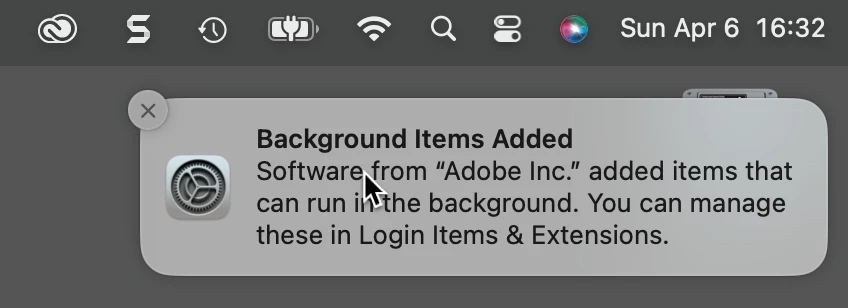
I don't need support, I only want to report this as a bug: I deleted Acrobat, and I got the same message one gets when installing: 


Again, everything is fine, but I don't think this should be happening! 

Correct answer IceFloe

Totally get how you feel — it's super frustrating, I know.
But... this probably isn’t a bug (at least not technically 😅).

Even after uninstalling,
there are still leftover files in places like:

/Library/PrivilegedHelperTools/com.adobe.ARMDC.Communicator
/Library/PrivilegedHelperTools/com.adobe.ARMDC.SMJobBlessHelper
/Library/PDF Services/Save as Adobe PDF.app

/Library/LaunchDaemons/com.adobe.ARMDC.Communicator.plist
/Library/LaunchDaemons/com.adobe.ARMDC.SMJobBlessHelper.plist
/Library/LaunchAgents/com.adobe.ARMDCHelper.XXXUUIDXXX.plist

/Library/Application Support/Adobe/ARMDC
/Library/Application Support/Adobe/ARMNext
/Library/Application Support/Adobe/Acrobat

If those are still hanging around, you'll likely need to do a proper cleanup.
Have you tried running the Cleaner Tool yet?
https://www.adobe.com/devnet-docs/acrobatetk/tools/Labs/AdobeAcroCleanerTool.dmg

Might be worth a shot.

Hope that helps!

2 replies

IceFloe
IceFloeCorrect answer
Participating Frequently
April 7, 2025

Totally get how you feel — it's super frustrating, I know.
But... this probably isn’t a bug (at least not technically 😅).

Even after uninstalling,
there are still leftover files in places like:

/Library/PrivilegedHelperTools/com.adobe.ARMDC.Communicator
/Library/PrivilegedHelperTools/com.adobe.ARMDC.SMJobBlessHelper
/Library/PDF Services/Save as Adobe PDF.app

/Library/LaunchDaemons/com.adobe.ARMDC.Communicator.plist
/Library/LaunchDaemons/com.adobe.ARMDC.SMJobBlessHelper.plist
/Library/LaunchAgents/com.adobe.ARMDCHelper.XXXUUIDXXX.plist

/Library/Application Support/Adobe/ARMDC
/Library/Application Support/Adobe/ARMNext
/Library/Application Support/Adobe/Acrobat

If those are still hanging around, you'll likely need to do a proper cleanup.
Have you tried running the Cleaner Tool yet?
https://www.adobe.com/devnet-docs/acrobatetk/tools/Labs/AdobeAcroCleanerTool.dmg

Might be worth a shot.

Hope that helps!

tlmurray23
Inspiring
April 7, 2025

I sent a wee interface bug to Apple. In a dialog, three buttons are shown, but the verb that is actually useful isn't there. As it turns out, you have to press Option to see it. According to Apple, it's not a bug because "it works as designed."

Pariah Burke
Community Expert
Community Expert
April 6, 2025

If you're uninstalled Acrobat and restarted your computer, it should be gone. Just to be sure--and for identifying if it's a bug--would you please post a screenshot of your Activity Monitor? Does it show any process starting with "acro" still running?


tlmurray23
Inspiring
May 28, 2025

I would, but Acrobat is back, as I deleted it just for temporary purposes. But asking whether any "acro~" processes are running avoids addressing the point: When you uninstall something, you should not get a message that background items were added. 


Now, if it were the case that "if you remove A, we had to add B to make C run properly," that's different, and the message should have said as much.